SeedProd MCP: headlines, text and image alt text from your AI agent
Does Widejoin work with SeedProd?
Widejoin lets your AI agent change SeedProd headlines, text and image alt text, tested on SeedProd Pro 6.19.8, and each change keeps a record. These writes come with the Pro add-on from $99 a year.
14 days of Pro on up to 10 sites. No card.
Free plugin: 5 SeedProd reads. Pro, $99 a year for 3 sites: all 4 SeedProd writes.
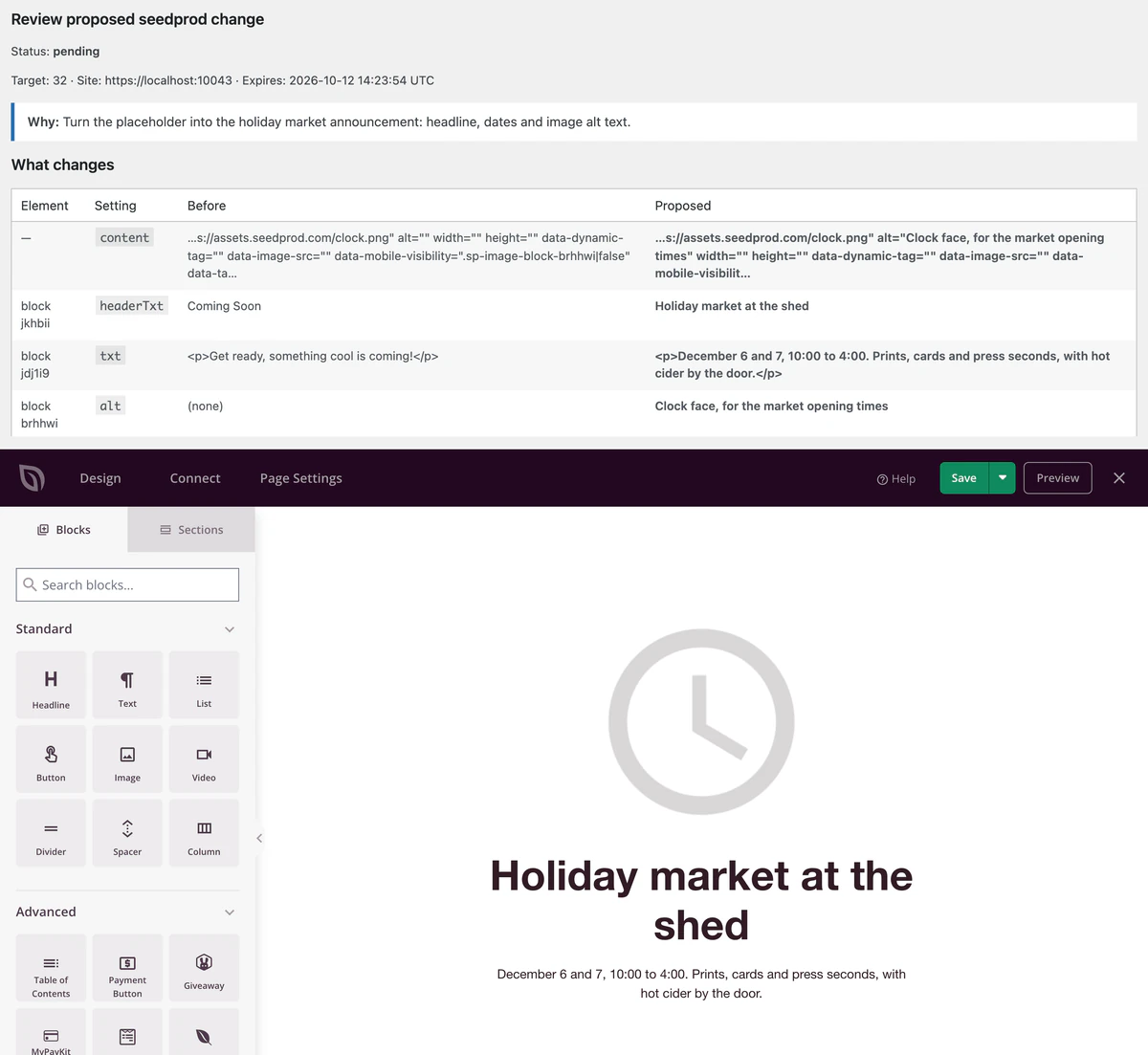
Headlines, text blocks and image alt text on a SeedProd landing page are what your AI agent edits through Widejoin, read from SeedProd's own layout. Each change applies at once in Direct mode as the agent's WordPress user and is recorded for restore, or waits for a person in wp-admin when the site uses Review first.
Which SeedProd tools does Widejoin have?
9 tools: 5 that read and 4 that write. read-seedprod reads every block on a page, create-seedprod-draft copies an existing SeedProd page into a new draft, and prepare-seedprod edits blocks, at once in Direct mode or after a person approves the change in Review first. The rest are list-seedprod-templates, read-seedprod-globals, read-seedprod-layout, seedprod-block-schema, prepare-seedprod-layout and prepare-seedprod-page-settings.
What can the agent change in SeedProd?
- Headline text.
- Text block content, filtered like post content, so scripts are stripped.
- Image alt text.
- New drafts, copied from an existing SeedProd page the way SeedProd's own Duplicate does.
- As changes you approve in Review first or that apply at once in Direct mode: moving, removing, duplicating and copying sections, rows and blocks (
prepare-seedprod-layout). - As changes you approve in Review first or that apply at once in Direct mode: SeedProd's page settings, such as the SEO title, no index and redirect (
prepare-seedprod-page-settings).
Both of those need the unfiltered_html capability; from an agent without it, the change waits for someone who has it. Each edit changes both SeedProd's saved design and the page visitors see, and everything else on the page stays byte for byte.
What will it not do in SeedProd?
It does not build new SeedProd layouts, because SeedProd draws its layouts in the browser and has no way to build one on the server. It also writes only to SeedProd 6.x.
What should I know before relying on it?
If someone edited a page outside SeedProd's builder, the page and SeedProd's saved design no longer match. Widejoin then refuses to edit it and asks for a save in SeedProd first, so it never writes over a page it cannot read reliably.
How does restore work?
Restore returns the exact previous page. In Direct mode the agent undoes a change with one restore-change call, and a person can restore it from the change's page in wp-admin, which says what restore covers: "Restore covers the captured fields. It cannot retract emails, webhooks or other external effects."
On 11 October 2026 we turned a placeholder into the Holiday market page of our demo client site. The headline changed from "Coming Soon" to "Holiday market at the shed", the text gained the market dates, and the clock image got the alt text "Clock face, for the market opening times". That lab site held every change for approval; once approved, SeedProd's builder reopened the page with the new headline.
Related: the Gutenberg integration, the Elementor integration, how a change works and Connect your AI client.
Questions
Which SeedProd version did you test?
SeedProd Pro 6.19.8, on WordPress 7.1.2.
Can the agent build a new SeedProd page from scratch?
No. It copies an existing SeedProd page into a draft and edits its headlines, text and alt text.
Why did Widejoin refuse to edit my SeedProd page?
The page was changed outside SeedProd's builder, so its saved design and its HTML no longer match. Save it once in SeedProd and try again.
Does it work with SeedProd 5?
No. Writes need SeedProd 6.x.
Point your agent at a client site today.
14 days of Pro on up to 10 sites. No card. Connect your client and ask for a page in the builder you already use.