WordPress MCP tools in Widejoin, by builder and by job
Widejoin's tools are grouped by builder and by job below, each marked free or Pro, so you can see what your agent can do in Elementor, Bricks, Divi or WooCommerce before you connect. They come with the free WordPress MCP plugin, and Widejoin pricing shows what the Pro add-on adds.
Free to start. No credit card.



Also tested: Yoast SEO 28.7, Rank Math 1.0.279, All in One SEO 5.0.2, ACF Pro 6.8.10, Contact Form 7 6.1.7, Tutor LMS 4.0.9, WPCode 2.3.9, Kadence 1.5.2, GeneratePress 3.6.1, Avada 7.16.2 with Fusion Builder 3.16.2, Beaver Themer 1.6.1, Gravity Forms 3.1.3, LearnDash 5.2.1, WPML 5.2.0, Yoast SEO Premium 28.7.
Plugin and theme names and marks belong to their owners; shown to indicate compatibility.
Every tool, by name.
Search by name or by what a tool does, such as "price", "alt" or "template", or filter by builder and job. 148 tools read the site and 159 write. The draft tools create unpublished drafts, and most of the rest change the site at once, each one recorded and most of them restorable, or wait for your approval on a site in Review first. The list is generated from the plugin's own endpoint for the current release, and the changelog names the tools each release added. Some clients limit how many tools they take: Cursor warns above 40, and VS Code with GitHub Copilot uses at most 128 per request. From 0.7.4, every site lists every tool of its active builders and plugins, on every environment type. A plain site with no builders lists 125 tools with the free plugin and 142 with Pro, down from 239 and 310 before 0.7.4. Tools of builders and plugins that are not active stay out of the list, and an administrator can list a family anyway under Widejoin, Settings, Advanced, with the Choose tools button. Through the Widejoin gateway, the client that connects decides the list. Claude Code, Claude Desktop and clients we do not recognise get the full list, and Claude Code loads large tool sets on demand by itself. VS Code with GitHub Copilot gets the full list when it fits the 128-tool limit. Otherwise it gets 110 ranked tools plus three small meta-tools, find-tools, describe-tool and call-tool, that reach the rest. Cursor gets compact mode, those three meta-tools only. Add ?tools=full or ?tools=compact to the MCP address to choose for yourself. A client connected straight to the plugin on your site, without Widejoin's gateway, always gets the full list. An administrator can also turn off the tools a site does not need with the same Choose tools button. For one job end to end, bulk alt text for up to 50 images in one change walks through the two media tools.
Elementor25 of 25
Writes a change: create-elementor-draft
Create a native draft page, either from simple widgets placed in one container, or from elements.
Writes a change: create-elementor-template-draft
Create a native draft page holding a copy of a saved page, section or container template.
Writes a change: create-elementor-theme-templatePro
Create an Elementor Pro theme-builder template as an unpublished draft with no display conditions, so it appears nowhere yet.
Reads: elementor-dynamic-tags
List registered dynamic tags (name, title, group, categories) for __dynamic__ settings.
Reads: elementor-mcp
Run a read-only tool of Elementor's official MCP.
Writes a change: elementor-mcp-run
Run elementor/create-page or elementor/create-preview-link from Elementor's official MCP.
Writes a change: elementor-regenerate-css
Clear Elementor's generated CSS files and data so they are rebuilt on the next visit (Elementor > Tools > Regenerate CSS & Data).
Reads: elementor-widget-schema
List installed widget names, or inspect one widget’s controls.
Reads: list-elementor-conditions
List the display conditions Elementor Pro offers (name, label and sub-conditions), for building condition strings such as include/singular/page/12.
Reads: list-elementor-custom-code
List Elementor Pro Custom Code snippets: title, status, location, priority, display conditions and code.
Reads: list-elementor-templates
List up to 100 saved Elementor templates with type and status.
Writes a change: prepare-elementor
Edit existing widgets by element_id anywhere in an Elementor layout, keeping every other element exactly as stored.
Writes a change: prepare-elementor-custom-codePro
Create, update or delete an Elementor Pro Custom Code snippet as a reviewed change.
Writes a change: prepare-elementor-displayPro
Publish or unpublish an Elementor Pro theme-builder template and set where it shows, as one administrator-reviewed change.
Writes a change: prepare-elementor-kitPro
Change the active Elementor kit (global colours, global fonts, typography, buttons, layout and other Site Settings) as one administrator-reviewed change.
Writes a change: prepare-elementor-layout
Change an Elementor page or template with ordered operations, as one reviewed change.
Writes a change: prepare-elementor-mcp
Run a write tool of Elementor's official MCP as a reviewed change.
Writes a change: prepare-elementor-page-settings
Change an Elementor document's page settings as a reviewed change: hide_title, template, background, padding, custom_css and any other page setting control.
Writes a change: prepare-hfe-displayPro
Publish a Header Footer Elementor template or change where it shows, as one reviewed change, previewed on a real page.
Writes a change: prepare-hfe-templatePro
Make a header, footer or before-footer section with the free Header Footer Elementor plugin, as one reviewed change.
Reads: read-elementor
Read an Elementor page or library template.
Reads: read-elementor-display
Read a theme-builder template's status, display conditions and (for popups) triggers and timing, with the fingerprint for prepare-elementor-display.
Reads: read-elementor-kit
Read the active Elementor kit: global colours, global fonts, typography, buttons, form fields, images, layout, plus its fingerprint for prepare-elementor-kit.
Reads: read-hfe-template
Read a Header Footer Elementor template: title, status, type, display rules, user roles, canvas setting, layout outline, a fingerprint for prepare-hfe-display, and the valid rule choices.
Writes a change: save-elementor-template
Save a copy of an Elementor page as a page, container or section template in the Elementor library, with fresh element IDs.
Divi24 of 24
Writes a change: create-divi-draftPro
Create a draft page laid out with Divi: one section of text, button, image and divider modules, saved in Divi's own format so it opens in the Divi Builder.
Writes a change: create-divi-layoutPro
Create a draft page, or a Divi Library item (layout, section, row or module), from a full element tree (see prepare-divi-layout for the element spec).
Writes a change: create-divi5-draftPro
Create a draft page from a Divi 5 block tree, stored the way the Divi 5 Visual Builder stores a page (see prepare-divi5-layout for the block spec).
Writes a change: create-divi5-library-itemPro
Create a Divi 5 Library item (a layout, section, row or module, global or not) as one reviewed change, like create-divi-layout does for Divi 4.
Reads: divi-module-schema
List Divi's registered modules, or one module's fields as the Visual Builder offers them, for prepare-divi-layout.
Reads: divi5-module-schema
List Divi 5's divi/* blocks from the theme's module library, or, with module, one block's full writable surface for prepare-divi5-layout.
Reads: list-divi-library
List Divi Library items (layouts, sections, rows, modules) with their type and whether they are global (shared, changing every page that uses them).
Reads: list-divi-theme-builder
List Divi Theme Builder templates: header, body and footer layouts, whether each is enabled, and where they apply, plus the condition IDs Divi offers.
Reads: list-divi5-library
List what is actually available in this install for Divi 5: the module library and the saved Library items Divi 5 stores locally.
Reads: list-divi5-theme-builder
List the Divi 5 Theme Builder templates in the same shape as list-divi-theme-builder.
Writes a change: prepare-diviPro
Edit text, button and image-alt fields of Divi modules by position (from read-divi) as a reviewed change; every other part of the layout stays byte for byte.
Writes a change: prepare-divi-globalsPro
Set Divi global colours as one administrator-reviewed change: global_colors {gcid-<name>: {color: "#hex" or rgba(), active: "yes"|"no"} or null to remove}.
Writes a change: prepare-divi-layoutPro
Change a Divi page, library item or Theme Builder layout with ordered operations, as one reviewed change.
Writes a change: prepare-divi-theme-templatePro
Create or change a Divi Theme Builder template as one administrator-reviewed change.
Writes a change: prepare-divi5-globalsPro
Change Divi 5's site-wide globals as one administrator-reviewed change.
Writes a change: prepare-divi5-layoutPro
Change a Divi 5 page with ordered operations, as one reviewed change.
Writes a change: prepare-divi5-theme-optionsPro
Change Divi's Theme Options as one administrator-reviewed change.
Writes a change: prepare-divi5-theme-templatePro
Create or change the record of a Divi 5 Theme Builder template as one administrator-reviewed change: title, enabled, use_on and exclude_from.
Reads: read-divi
List the text, button, image and divider modules of a Divi layout by position, with their editable fields and a fingerprint for prepare-divi.
Reads: read-divi-globals
Read Divi's global colours (referenced from fields as gcid-...) and element presets.
Reads: read-divi-layout
Read a Divi page, library item or Theme Builder layout: an outline of every section, row, column and module by path, with labels and text.
Reads: read-divi5-globals
Read Divi 5's site-wide global settings from where Divi 5 stores them: the global colour palette, global variables, and element presets.
Reads: read-divi5-layout
Read a Divi 5 page: an outline of every section, row, column and module by path (dotted positions such as 0.1.0), with labels and text.
Reads: read-divi5-theme-options
Read Divi's Theme Options as fields taken from Divi's own ePanel definition.
Bricks12 of 12
Reads: bricks-element-schema
List the registered Bricks elements, or one element's controls for prepare-bricks-layout.
Writes a change: create-bricks-draftPro
Create a draft page laid out with Bricks, saved in Bricks' own format so it opens in the Bricks builder: either elements or layout.
Writes a change: create-bricks-templatePro
Create a Bricks template as an unpublished draft with no conditions, so it shows nowhere yet.
Reads: list-bricks-templates
List Bricks templates (header, footer, section, popup, archive, search, error, ...) with status and conditions.
Writes a change: prepare-bricksPro
Edit heading text and tag, text-basic text, button text and URL, and image alt of Bricks elements by ID as a reviewed change; every other element and setting stays as stored.
Writes a change: prepare-bricks-globalsPro
Change Bricks global styles as one administrator-reviewed change.
Writes a change: prepare-bricks-layoutPro
Change a Bricks page or template with ordered operations, as one reviewed change.
Writes a change: prepare-bricks-page-settingsPro
Change a Bricks page's settings as a reviewed change.
Writes a change: prepare-bricks-template-settingsPro
Publish or unpublish a Bricks template and change its settings as one administrator-reviewed change.
Reads: read-bricks
List the heading, text-basic, button, image and divider elements of a Bricks layout by element ID, with their editable fields and a fingerprint for prepare-bricks.
Reads: read-bricks-globals
Read Bricks global classes, colour palettes, global variables, theme styles, components and breakpoints.
Reads: read-bricks-layout
Read a Bricks page or template: an outline of every element (id, type, label, text) and a fingerprint.
Beaver Builder19 of 19
Reads: beaver-module-schema
List every registered Beaver module, or the fields of one module or form with type, options, units, responsive flag and nested form, for the node settings of prepare-beaver-layout.
Reads: beaver-modules
List installed Beaver modules and identify Widejoin draft support.
Writes a change: create-beaver-draftPro
Create an unpublished native Beaver page.
Reads: list-beaver-revisions
List the WordPress revisions of a Beaver page, post or saved template that hold a Beaver layout, newest first, as WordPress's revisions screen lists them.
Reads: list-beaver-templates
List Beaver's template library: saved layouts, rows, columns and modules (id, title, type, module, global), for insert_template in prepare-beaver-layout.
Reads: list-beaver-theme-layouts
List Beaver Themer layouts: id, title, status, type, part hook, order, location, exclusion and user rules, node count and whether the theme supports the type; plus every location Themer's own registry offers, the user rules, the layout types, and the part hooks the theme registers.
Writes a change: prepare-beaverPro
Edit existing heading, rich-text, html, photo or button nodes by ID, in any row or column, preserving layout and other settings.
Writes a change: prepare-beaver-globalsPro
Change Beaver's global settings and global styles as one administrator-reviewed change.
Writes a change: prepare-beaver-layoutPro
Change a Beaver page, post or saved template with ordered operations, as one reviewed change.
Writes a change: prepare-beaver-layout-settingsPro
Change the CSS and JavaScript of one Beaver layout (Beaver's Layout CSS & JavaScript panel) as a reviewed change.
Writes a change: prepare-beaver-page-templatePro
Change the page template a Beaver page or post renders on (WordPress's Page Attributes template) as one reviewed change.
Writes a change: prepare-beaver-publishPro
Publish the staged Beaver draft of a page, post or saved template as one reviewed change.
Writes a change: prepare-beaver-revision-restorePro
Stage the Beaver layout of one revision from list-beaver-revisions as the draft of its page, post or saved template, as Beaver's own Revisions panel does.
Writes a change: prepare-beaver-theme-layoutPro
Create or change a Beaver Themer layout as one administrator-reviewed change.
Reads: read-beaver
Read native published and draft node maps, layout settings and a conflict fingerprint.
Reads: read-beaver-globals
Read Beaver's global settings and global styles as Beaver resolves them.
Reads: read-beaver-layout
Read a Beaver page, post or saved template: an outline of every row, column group, column and module (id, type, label, text, global) and a fingerprint.
Reads: read-beaver-theme-layout
Read one Beaver Themer layout: its record, the blast radius of its rules, a fingerprint and its content as an outline of rows, columns and modules, or with format "export" as node specs reusable in prepare-beaver-theme-layout.
Writes a change: save-beaver-templatePro
Propose saving a copy of a Beaver page to Beaver's template library as a layout, row, column or module template, with fresh node IDs.
SeedProd9 of 9
Writes a change: create-seedprod-draftPro
Start a draft SeedProd page from a copy of an existing SeedProd page, the way SeedProd's Duplicate does, then change its blocks with prepare-seedprod.
Reads: list-seedprod-templates
List what SeedProd keeps on this site: landing pages, theme-builder templates (header, footer, page, part, ...
Writes a change: prepare-seedprodPro
Edit headline text, text blocks and image alt by block ID as a reviewed change, in both the page SeedProd shows visitors and the document its builder opens.
Writes a change: prepare-seedprod-layoutPro
Change a SeedProd landing page with ordered operations, as one reviewed change.
Writes a change: prepare-seedprod-page-settingsPro
Change a SeedProd landing page's page settings as a reviewed change: the keys of SeedProd's own page defaults, each with the type SeedProd declares.
Reads: read-seedprod
List the blocks of a SeedProd page by block ID with their type; headline, text and image blocks show their editable fields and whether the page HTML matches them.
Reads: read-seedprod-globals
Read SeedProd's Global CSS document and where it applies: SeedProd serves the CSS its builder generates from it on theme-builder pages, never on landing pages.
Reads: read-seedprod-layout
Read a SeedProd page as a tree: sections > rows > cols > blocks, each with its ID, type and whether SeedProd's HTML for it is in place; blocks carry their name, and headline, text and image blocks their editable fields.
Reads: seedprod-block-schema
List SeedProd's blocks from SeedProd's own definitions, or one block's settings with their default values.
WPBakery8 of 8
Writes a change: create-wpbakery-draftPro
Create a draft page laid out with WPBakery from a full element tree, saved as WPBakery's own shortcodes so it opens in WPBakery's editor; template_id starts it from a template.
Reads: list-wpbakery-templates
List WPBakery templates: the ones users saved and WPBakery's default templates, with the id prepare-wpbakery-layout insert_template and create-wpbakery-draft take; template_id returns one template's element tree.
Writes a change: prepare-wpbakery-grid-itemPro
Create or change a WPBakery Grid Builder template (the layout of each item in a post grid) as one reviewed change.
Writes a change: prepare-wpbakery-layoutPro
Change a WPBakery page as one reviewed change, with ordered operations on elements addressed by path, each resolved against the layout as it is at that operation.
Reads: read-wpbakery-grid-item
List WPBakery Grid Builder templates, with the value a grid's item param takes; post_id reads one template as an outline by path or its full element tree with a fingerprint for prepare-wpbakery-grid-item; template_id returns a predefined template's element tree.
Reads: read-wpbakery-layout
Read a WPBakery page: an outline of every row, column and element by path with the params WPBakery labels them by, or the full element tree, its custom CSS and a fingerprint for prepare-wpbakery-layout.
Writes a change: save-wpbakery-templatePro
Propose saving a WPBakery user template, from a WPBakery page or an element tree, as one reviewed change; remove_template_id deletes a user template instead.
Reads: wpbakery-element-schema
List the elements mapped in WPBakery's registry, or one element's params with their types and allowed values.
Gutenberg blocks and site design19 of 19
Reads: block-types
List registered Gutenberg block types, filtered by search or namespace; or, with name, one block's attributes, parent, ancestor, allowed_blocks, supports and styles.
Reads: list-block-patterns
List registered block patterns and saved patterns, filtered by search or category.
Reads: list-designs
List up to 50 database-backed templates, template parts and navigation objects.
Reads: list-fonts
List the Font Library: installed families with their faces, the font families the active styles offer, styles_fingerprint for prepare-font-install, and up to 20 Google Fonts families with their faces as "weight style".
Reads: list-style-variations
List the active block theme's style variations.
Writes a change: prepare-block-template
Customise a block theme template or template part, or add a new one, as one reviewed change.
Writes a change: prepare-blocks
Propose block-level edits without changing live content.
Writes a change: prepare-font-install
Install a font into the WordPress Font Library as one reviewed change.
Writes a change: prepare-menu
Create (omit menu_id, give name), rename, rebuild or delete a classic menu, and assign it to theme locations, as one reviewed change.
Writes a change: prepare-navigation
Create or update a block theme navigation menu as a reviewed change.
Writes a change: prepare-permalinks
Change the permalink structure and optionally the category and tag bases, as a reviewed change.
Writes a change: prepare-site-identity
Set or remove (0) the site logo (custom logo, also used by the Site Logo block) and the site icon (favicon) from Media Library images, as a reviewed change.
Writes a change: prepare-site-scaffold
Create a site's skeleton as one reviewed change.
Writes a change: prepare-style-variation
Propose applying one of the active block theme's style variations (slug from list-style-variations) as a reviewed global styles change.
Writes a change: prepare-synced-pattern
Create (omit pattern_id) or update a saved pattern (wp_block) from block specs, as a reviewed change.
Writes a change: prepare-template-revert
Remove the saved copy of a block theme template or part so the theme file's version shows again, as one reviewed change.
Writes a change: prepare-widgets
Set the widgets of one or more sidebars as a reviewed change.
Reads: read-block-template
Read one template or template part of the active block theme.
Reads: read-blocks
Read a post or page as a tree of blocks with paths ("2", "2.1"), names, attributes and text.
Avada7 of 7
Reads: avada-element-schema
List the elements in Avada Builder's own element map, or one element's params for prepare-avada-layout.
Writes a change: create-avada-draftPro
Propose a new draft page laid out with Avada Builder from a full element tree, as one reviewed change.
Reads: list-avada-templates
List the Avada Builder Library: saved page templates, containers, columns and elements, including Avada Studio items once they are imported into this site, with the id prepare-avada-layout's insert_template takes.
Writes a change: prepare-avada-layoutPro
Change an Avada Builder page or post as one reviewed change, with ordered operations on elements addressed by path, each resolved against the layout as it is at that step.
Writes a change: prepare-avada-optionsPro
Change Avada's site-wide Options as one administrator-reviewed change.
Reads: read-avada-layout
Read an Avada Builder page or post: an outline of every container, row, column and element by path, with the params Avada labels them by and their text; shortcodes Avada has not mapped are listed as unmapped and kept exactly.
Reads: read-avada-options
Read Avada's site-wide Options as Avada saved them: each option with a plain value, whether it is code, and the names of options that hold structured values.
Content and taxonomy33 of 33
Writes a change: create-draft
Create an unpublished post, page or custom-post-type item from blocks: the documented core types, any registered block by name or a registered pattern.
Reads: dry-run-replacementPro
Count exact occurrences of a text, per item, without writing anything.
Writes a change: finish-site-importPro
Make the image sizes for an applied site import, for up to time_budget seconds per call; call again with the returned cursor until done is true.
Reads: get-content
Read a post or page, including its block markup and review URL, if the current user may edit it.
Reads: inspect-meta-schema
Administrator-only registered metadata schema inspection.
Reads: list-comments
List up to 50 comments you may moderate, newest first, optionally by status: ID, post, author name, status, date, a text excerpt and a change fingerprint.
Reads: list-content
List posts, pages or custom-post-type items (type; see site-info content_types) the current user may edit.
Reads: list-redirects
List the redirects of the redirect manager that is active on this site.
Reads: list-site-kits
List site kits already on this site, without changing it.
Reads: list-tablepress-tables
Tables of the TablePress plugin you may edit, with id, name, description, number of rows and columns and the [table id=… /] shortcode.
Reads: list-taxonomy
Read up to 100 terms of category or post_tag, and with WooCommerce active product_cat, product_tag or an approved attribute, for content and product edits and prepare-term.
Reads: list-users
List the site's users, ordered by ID (limit up to 100, offset, optional search and role filter).
Writes a change: plan-site-import
Read a site kit an administrator uploaded in Media, or a kit_ref from list-site-kits, and list what importing it would add, without changing the site.
Writes a change: prepare-bulk-replacementPro
Turn one dry run page into one change: pass the same arguments (cursor included) and that page's fingerprint.
Writes a change: prepare-comment
Propose approving, holding, marking as spam or trashing one comment; restore returns the previous status.
Writes a change: prepare-comment-text
Post a comment or a reply as you (approved, under your name), or change a comment's text.
Writes a change: prepare-comments
Approve, unapprove, mark as spam, trash or untrash up to 50 comments in one call, as one change per comment; each one restores to its earlier status.
Writes a change: prepare-content
Prepare an edit without changing live content.
Writes a change: prepare-post-status
Publish, schedule, unpublish or untrash, or trash a post, page or custom post type item as one change restore undoes exactly.
Writes a change: prepare-redirect
Add one redirect through the active redirect manager's own API as an administrator-reviewed change: from, to (http URL or path; omit for 410/451), code.
Writes a change: prepare-replacement
Replace a literal string in one post/page after checking its fingerprint and expected occurrence count.
Writes a change: prepare-site-importPro
Propose a planned kit as ONE reviewed change: pages and posts as drafts, reusable blocks, menus, categories and tags, and the images.
Writes a change: prepare-tablepress-table
Edit a TablePress table as one administrator-reviewed change, saved through TablePress's own table model (the call its editor makes).
Writes a change: prepare-term
Propose creating, renaming, re-parenting (hierarchical taxonomies) or deleting a category or tag for browser review.
Writes a change: prepare-user
One NON-administrator account as a reviewed change that a person approves on its own and that restores exactly.
Writes a change: prepare-user-role
Propose one user's new role for browser review.
Reads: read-comment
Read one comment you may moderate: post, parent, author name, status, date, full text and a fingerprint for prepare-comment-text.
Reads: read-tablepress-table
One TablePress table: name, description, every cell as text, the table options, which rows and columns are shown, the shortcode and a fingerprint for prepare-tablepress-table.
Reads: read-term
Read a category or tag with its assigned post IDs and a fingerprint for prepare-term.
Reads: read-user-role
Read one user's role, the roles you may assign, and a change fingerprint.
Reads: search-site-content
Search the text of pages, posts, templates and builder globals across every builder at once.
Reads: site-import-status
Read a site import by plan_id or change_id.
Writes a change: stage-site-importPro
Download what a plan from plan-site-import lists as remote into Widejoin's private store, for up to time_budget seconds per call.
Events (The Events Calendar)5 of 5
Reads: list-tec-events
Events of The Events Calendar you may edit, ordered by start date: id, title, status, start and end, timezone, all-day, venue and organizer names and link.
Reads: list-tec-organizers
Organizers of The Events Calendar you may edit: id, name, status, email, phone and website as entered for the public event page.
Reads: list-tec-venues
Venues of The Events Calendar you may edit: id, name, status, address, city, state or province, zip, country, phone and website.
Writes a change: prepare-tec-event
Create a new DRAFT event, or edit an existing one, as one administrator-reviewed change, saved through The Events Calendar's own ORM (tribe_events->create / ->save).
Reads: read-tec-event
One event: title, description, excerpt, start and end, timezone, all-day, duration, cost, website, venues, organizers, categories, featured, hidden from upcoming, link, and a fingerprint for prepare-tec-event.
Media15 of 15
Writes a change: import-image
Import a public PNG, JPEG, WebP or AVIF (where the server supports it) up to 10 MB, or an SVG up to 500 KB (cleaned with Elementor's SVG sanitizer).
Writes a change: import-openverse-image
Import an image found with search-images, by its Openverse ID, through the same validated download as import-image.
Writes a change: import-pdf
Import a PDF from a public HTTPS URL on port 443, up to 10 MB and never above the site's upload limit.
Reads: list-media-missing-alt
Images without alt text, with thumbnail, file name and fingerprint for prepare-media-batch: those used on one page or, without post_id, in the Media Library.
Reads: list-media-url-scheme
Attachments on this site whose web address is stored as http://, with a fingerprint for prepare-media-url-fix.
Writes a change: prepare-media
Prepare title, caption, description and alt text for browser approval, conflict detection and restoration.
Writes a change: prepare-media-batchPro
Propose alt text, caption, title or description for up to 50 images as one reviewed change.
Writes a change: prepare-media-resize
Resize, crop or regenerate the sizes of a Media Library image as one reviewed change.
Writes a change: prepare-media-url-fixPro
Correct the stored web address of up to 100 attachments from http:// to https://, as one reviewed change: items [{attachment_id, expected_fingerprint}].
Reads: read-media
Read editable attachment metadata and its conflict fingerprint.
Reads: search-icons
Search the icon libraries on this site by name or keyword and get, for each hit, the icon id and the exact value that builder stores for it.
Reads: search-images
Search Openverse for openly licensed images.
Writes a change: upload-image
Upload a base64-encoded PNG, JPEG or WebP (up to 1 MB) into the media library.
Writes a change: upload-pdf
Upload a base64-encoded PDF (up to 1 MB decoded, and never above the site's upload limit) into the media library.
Writes a change: upload-svg
Store an SVG in the Media Library after cleaning it with Elementor's SVG sanitizer.
Multilingual (Polylang and WPML)4 of 4
Reads: list-languages
The languages of the active multilingual plugin: Polylang (code, name, locale, rtl, default) or WPML (read through its documented wpml_* filters).
Writes a change: prepare-translated-copy
Create a draft copy of post_id in language, linked to it as its translation through the multilingual plugin, as one reviewed, restorable change.
Writes a change: prepare-translation-link
Link an existing post as the translation of post_id into language, through the multilingual plugin, as one reviewed, restorable change.
Reads: read-translations
Which translations of a post or term exist and their status, from the active multilingual plugin, with a fingerprint for the prepare abilities.
WooCommerce16 of 16
Writes a change: create-product-draft
Create a simple WooCommerce product as a draft, with optional description, sale price, images, categories, tags, attributes, weight, dimensions and stock.
Writes a change: create-variable-product-draft
Create a draft WooCommerce variable product with 1 to 3 attributes and up to 50 variations, one per option combination, each with a regular price and optional stock quantity and image.
Reads: list-orders
Read up to 20 order summaries, newest first: ID, status, total, currency, creation date and item count.
Reads: list-product-variations
List a variable product's variations with their option choices, prices, stock and image, for reviewed variation edits.
Writes a change: prepare-coupon
Propose creating, updating or trashing a WooCommerce coupon for browser review; each is approved on its own page, never in bulk.
Writes a change: prepare-order-note
Add a note to a WooCommerce order, under your name.
Writes a change: prepare-product-attribute
Propose creating or updating a global WooCommerce product attribute (such as Colour) for browser review.
Writes a change: prepare-product-bulk-editPro
Change regular price, sale price, stock quantity or stock status of up to 100 simple products or variations, by product_ids or a filter.
Writes a change: prepare-product-delete
Move a WooCommerce product (and its variations) to the trash as a change restore undoes while it is in the trash.
Writes a change: prepare-woo-customer
Change a WooCommerce customer's first or last name, or billing or shipping address fields, through WooCommerce.
Writes a change: prepare-woo-gatewayPro
Propose turning a WooCommerce payment method on or off, or changing its title, description or instructions, for browser review; each is approved on its own page.
Writes a change: prepare-woo-settingsPro
Propose WooCommerce store settings for browser review.
Writes a change: prepare-woo-shipping-zonePro
Propose creating, updating or deleting a WooCommerce shipping zone for browser review.
Writes a change: prepare-woo-tax-ratePro
Propose creating, updating or deleting a standard WooCommerce tax rate for browser review.
Reads: read-woo-customers
Read one WooCommerce customer by ID, or up to 20 found by name or email.
Reads: read-woo-store
Read the WooCommerce store setup with a fingerprint per item for the prepare-woo tools.
Updates and maintenance11 of 11
Reads: core-update-preflight
Check a WordPress core update before proposing it.
Reads: data-upgrade-status
Plugin database upgrades pending after updates.
Reads: extension-update-preflight
Before proposing a plugin or theme update.
Reads: maintenance-inventory
Read installed versions and cached update availability.
Reads: plugin-usage
Where each active plugin is used: the Elementor widgets, shortcodes and blocks it registers that appear in published content, with item counts and IDs, and, on a sample of rendered pages, whether its scripts and stylesheets load there, including pages that load them without using the plugin.
Writes a change: prepare-core-updatePro
Propose updating WordPress to a version core-update-preflight reports as ready.
Writes a change: prepare-data-upgradePro
Propose running a pending plugin database upgrade (Elementor, Elementor Pro) through the plugin's own updater, as its WP-CLI command does.
Writes a change: prepare-extension-allowlistPro
Propose adding WordPress.org plugin or theme slugs (type, default plugin) to the install allowlist, up to 20 at once.
Writes a change: prepare-extension-operation
Propose installing, activating, deactivating or updating a plugin, or installing, activating or updating a theme.
Writes a change: prepare-update-planPro
Turn "update WordPress and the plugins" into one reviewed plan.
Writes a change: purge-cache
Purge one post's cached pages or the whole site's cache from the object cache and supported page-cache plugins.
Snippets (WPCode)5 of 5
Writes a change: create-disabled-snippetPro
Save PHP, JavaScript, CSS or HTML as an inactive snippet with automatic insertion disabled.
Reads: list-snippets
Administrator-only paginated snippet inventory.
Writes a change: prepare-snippetPro
Propose title/code/type changes to an inactive manual snippet.
Writes a change: prepare-snippet-activationPro
Propose turning a manual (shortcode) WPCode snippet on or off.
Reads: read-snippet
Read up to 100 KB of code as untrusted text, without execution.
Themes16 of 16
Writes a change: create-child-theme-draft
Create a draft child theme of an installed theme (the active theme's parent by default): style.css and a functions.php that loads both stylesheets.
Writes a change: create-theme-draft
Copy the active theme (block, classic or child) into an inactive draft folder; the live site is unchanged.
Writes a change: create-theme-file
Create an HTML/CSS/JSON/PHP file in a draft after checking the draft hash.
Writes a change: delete-theme-file
Remove one HTML/CSS/JSON/PHP file from an inactive draft after checking its overall hash.
Reads: export-theme-draft
The draft's files (base64, up to 8 MB in total), its parent theme and this site's WordPress version, for the isolated staging runtime.
Writes a change: prepare-additional-css
Replace the active theme's Additional CSS (the Customizer / Site Editor custom CSS) as a reviewed change.
Writes a change: prepare-theme-mods
Change the active theme's Customizer settings as one administrator-reviewed change.
Writes a change: prepare-theme-settings
Change the active theme's settings by name as one reviewed change that administrators approve in wp-admin.
Writes a change: publish-theme-draft
Make a staged theme draft the live theme, as you, on a Direct mode site.
Reads: read-theme-file
Read an existing HTML/CSS/JSON/PHP draft file with its SHA-256 for a later edit.
Reads: read-theme-mods
Lists every Customizer setting the ACTIVE theme registers, found by booting the Customizer in memory and reading what it registered, so it works for any theme with no per-theme list.
Reads: read-theme-settings
Theme settings by name for the active theme (Astra, Hello Elementor, OceanWP, Blocksy, Neve, Kadence or GeneratePress, or a child of one).
Writes a change: record-theme-staging
Used by the gateway's staging runtime to record a staging result for a draft, bound to the draft's file digest.
Reads: search-theme-files
Literal case-sensitive search across supported HTML/CSS/JSON/PHP files up to 200 KB each.
Reads: theme-draft-status
Read file names, content fingerprint, active theme and the human review URL; kind, parent and whether the parent's updates keep reaching the site; carry_over, what publishing copies from the active theme and the theme-named settings it shares instead; and publish_check, why the publish button would refuse now.
Writes a change: write-theme-file
Replace an existing draft HTML/CSS/JSON/PHP file after matching its hash.
Audits and diagnostics14 of 14
Reads: audit-log
Read the latest 50 connector audit records, without content or credentials.
Reads: audit-page-contentPro
Audit one of this site's published pages as rendered.
Reads: audit-page-contrastPro
WCAG 2.2 colour contrast of the text on one of this site's published pages: foreground against background, grouped by colour pair, failing pairs first.
Reads: cli-read
Native PHP equivalents of read-only WP-CLI commands.
Reads: connection-diagnostics
Report the current actor, protocol prerequisites and effective capabilities without passwords, tokens or server paths.
Reads: find-broken-linksPro
Find links in post and page content that go nowhere.
Reads: integrations
Report installed plugin versions and the supported operation subset.
Reads: read-php-errors
Recent entries from WordPress's debug.log and the PHP error log where readable, plus the guard's recorded fatal errors, grouped by the plugin, theme or core file that owns them, each with a time, level, message and repeat count.
Reads: read-site-structure
Read what shapes the whole site: classic menus and theme menu locations, block navigation, sidebars and their widgets, site logo and icon, Additional CSS, permalink structure and the front page setting, plus site_templates: the builder headers, footers and other site-wide templates with their display conditions and the menus their nav widgets render.
Reads: rendered-html
Fetch up to 200 KB of this site’s published post/page HTML.
Reads: scan-abandoned-pluginsPro
Look up each installed plugin on WordPress.org and flag the ones that were closed there or have not been updated in a long time; plugins not in the directory are listed as such.
Reads: scan-core-integrityPro
Compare the WordPress files in the root, wp-admin and wp-includes with the official WordPress.org checksums for this version and locale.
Reads: scan-site-hardeningPro
Run a hardening review: WordPress Site Health results for core, plugin and theme versions, debug mode and HTTPS, plus checks Site Health lacks.
Reads: site-info
Inspect the authenticated WordPress site and supported connector features.
Forms (CF7)9 of 9
Reads: form-placement
How to show a Contact Form 7, WPForms, Fluent Forms or Gravity Forms form in a builder.
Reads: list-forms
Contact Form 7, WPForms, Fluent Forms and Gravity Forms forms you can edit, each with its plugin, shortcode and fields.
Writes a change: prepare-form
Edit a Contact Form 7 or WPForms form as a reviewed change: title; edits to fields by name; add_fields; remove_fields; submit_label; messages.
Writes a change: prepare-form-delivery
Administrators: change who receives a Contact Form 7, WPForms, Fluent Forms or Gravity Forms form's mail as a reviewed change approved on its own.
Writes a change: prepare-mail-smtp
Administrators: change which WP Mail SMTP mailer sends the site's mail, or the From email and name and whether they are forced on every message, as a reviewed change approved on its own.
Writes a change: prepare-new-form
Propose a new form in plugin contact-form-7, wpforms, fluentform or gravityforms from a field list, with submit_label and, for CF7, messages.
Reads: read-form
One form: its title and each field, the CF7 template and messages or the WPForms submit label, plus a fingerprint for prepare-form.
Reads: read-form-delivery
Administrators: who receives a Contact Form 7, WPForms, Fluent Forms or Gravity Forms form's mail and from whom, with Cc, Bcc and attachments as counts, whether Mail auto-replies are on, the tags the message may use, and a fingerprint for prepare-form-delivery.
Reads: read-mail-smtp
Administrators: which WP Mail SMTP mailer sends every email this site sends, and the From email and name with their force switches; the mailers with ready, the keys wp-config.php constants lock, and the fingerprint prepare-mail-smtp needs.
LMS (LifterLMS)3 of 3
Reads: list-lifterlms-courses
LifterLMS courses you can edit, with status, link and section and lesson counts (the LifterLMS counterpart of list-courses).
Writes a change: prepare-lifterlms-course
Edit a LifterLMS course as one administrator-reviewed change, written through LifterLMS's own model classes (the calls its course builder makes).
Reads: read-lifterlms-course
One LifterLMS course: title, description, excerpt and its sections in course order, each with its lessons, plus a fingerprint for prepare-lifterlms-course.
LMS (Tutor)4 of 4
Writes a change: create-course-draft
Create a draft course with its curriculum, saved as the plugin's course builder saves it.
Reads: list-courses
Courses you can manage, with status, link and counts: Tutor LMS (topics, lessons) and LearnDash (lessons, topics, quizzes).
Writes a change: prepare-course
Edit a course as one reviewed change, by ID from read-course.
Reads: read-course
One course in its plugin's order, plus a fingerprint for prepare-course: title, description, excerpt and curriculum.
Multilingual (TranslatePress)4 of 4
Writes a change: prepare-translation-languages
TranslatePress: set the languages besides the default (the full list), each with its URL slug and whether visitors see it.
Writes a change: prepare-translations
TranslatePress: translate texts into one of the site's languages: a page's texts, a menu item's label or any site text.
Reads: read-translation-settings
TranslatePress: the default language, the other languages with their URL slug, published state and home URL, and how many languages the plan allows.
Reads: read-untranslated-strings
TranslatePress: the texts of a page or post that have no translation yet in one of the site's languages, and the ones that do, with the page's URL in that language.
Plugin fields: SEO, ACF, Elementor, product16 of 16
Writes a change: prepare-acf-definition
Create or change one ACF definition as an administrator-reviewed change that restores exactly.
Writes a change: prepare-acf-options-values
Change values on one ACF PRO options page as a reviewed change that restores exactly.
Writes a change: prepare-cptui-definition
Create, change or delete one Custom Post Type UI post type or taxonomy as an administrator-reviewed change that restores exactly.
Writes a change: prepare-integration
Prepare supported plugin changes for human review, without touching the live data.
Writes a change: prepare-json-ld
Propose structured data for one published post or page as a reviewed, restorable change.
Writes a change: prepare-metabox-values
Change Meta Box field values on one post as a reviewed change that restores exactly.
Writes a change: prepare-seo-schema
Write structured data into the active SEO plugin's own schema store as an administrator-reviewed, restorable change (never into post content).
Writes a change: prepare-seo-settings
Change site-level SEO settings as one reviewed change.
Reads: read-acf-definitions
Read the Advanced Custom Fields definitions on this site: field groups, custom post types and taxonomies ACF registers, and ACF PRO options pages.
Reads: read-acf-options-values
Read the values entered on one ACF PRO options page.
Reads: read-cptui-definitions
Read the post types and taxonomies Custom Post Type UI registers.
Reads: read-integration
Read supported SEO, ACF, registered post meta, Elementor or product fields and a fingerprint for preparing edits.
Reads: read-json-ld
Read the structured data Widejoin stores for one post or page: the typed nodes, the fingerprint prepare-json-ld needs, and which plugin prints them.
Reads: read-metabox-fields
List the fields the Meta Box plugin has registered for a post's type, found in Meta Box's own field registry, with each field's id, label, type, whether it holds several values or clones, its choices, the sanitizer that guards it, whether it is writable here and its stored value as Meta Box reads it, plus a fingerprint of the values.
Reads: read-seo-schema
Read the structured data (schema.org JSON-LD) the ACTIVE SEO plugin stores for a post, with a fingerprint for prepare-seo-schema.
Reads: read-seo-settings
Site-level settings of the active Yoast SEO, Rank Math or All in One SEO.
Abilities2 of 2
Reads: discover-abilities
Administrator-only schema discovery.
Writes a change: run-ability
Run another plugin's ability after an administrator classified it.
Review, restore and change log13 of 13
Reads: change-events
Status transitions of proposed changes you can review (pending, applied, rejected, restored, withdrawn, superseded, failed), after a sequence number.
Reads: change-status
Read the status and review link of an authorized change.
Writes a change: create-checkpoint
Mark this point in the site's change history with a name, before a risky batch of changes.
Reads: list-changes
List proposed changes you may review, newest first, with a readable title, target, proposer and review link.
Reads: list-checkpoints
List the newest 50 checkpoints, newest first: checkpoint_id, name, who made it, when, and changes_since.
Reads: list-revisions
List up to 50 saved revisions of a post or page, newest first, with author, date, title and a short excerpt, plus the change_fingerprint for prepare-revision-restore.
Reads: operation-receipt
Find the stored result of a draft/image/product creation by your request_id.
Writes a change: prepare-change-restore
Propose undoing an applied change you may review.
Writes a change: prepare-checkpoint-restore
Propose ONE change that restores every change applied after a checkpoint, or every applied change you made on this MCP session, newest first.
Writes a change: prepare-revision-restore
Propose restoring the title, content and excerpt of a saved revision.
Reads: preview-change
Render a pending change's current and proposed page on the server, as the review page shows them, without a browser.
Writes a change: restore-change
Undo an applied change you may review: puts back the state it captured before it ran.
Writes a change: withdraw-change
Withdraw a pending change you proposed or may review, for example one made by mistake or superseded by a newer proposal.
Settings and global styles11 of 11
Writes a change: prepare-breakpoints
Change one builder's responsive breakpoints as one administrator-reviewed change, written through the builder's own writer.
Writes a change: prepare-consent
Propose the cookie banner as one reviewed change that restores exactly.
Writes a change: prepare-launch
Propose the launch as one reviewed change.
Writes a change: prepare-measurement-id
Propose sending page views to Google Analytics 4 with one measurement ID (G-...), as a change a person approves on its own and that restores exactly.
Writes a change: prepare-operation
Prepare allowlisted settings, global styles or saved block design edits for wp-admin approval and restoration.
Writes a change: prepare-option
Change or create one WordPress option outside the prepare-operation settings list, as a change with an exact restore.
Reads: read-analytics
Who places Google's tag on this site: Site Kit, MonsterInsights, WPCode snippets that load gtag.js, the consent plugin and whether its banner shows, and a fingerprint for prepare-measurement-id.
Reads: read-breakpoints
Read the responsive breakpoints of each page builder active on this site, from the builder's own storage: Elementor, Beaver and Bricks.
Reads: read-consent
What the active consent plugin asks visitors.
Reads: read-operation
Read allowlisted site settings, the active theme's user global styles or an existing saved block template, template part or navigation with a fingerprint.
Reads: read-option
Read one WordPress option by name: its value, whether it autoloads, a fingerprint for prepare-option, and whether prepare-option may change it.
Site playbook3 of 3
Reads: get-playbook
Read the current site conventions (tone, structure, image and SEO rules) and their version before writing content.
Reads: list-playbook-versions
List saved versions of the site playbook, oldest first, with author, date and text.
Writes a change: prepare-playbook
Propose a new version of the site playbook, for example drafted from the existing site.
No tool matches. Try a builder name, or a job like update, alt or price.
Open a tool for its description. The list is generated from the plugin's live endpoint on our lab.
Questions
How many tools does Widejoin have?
307 on the WordPress plugin, 236 of them in the free plugin and the other 71 in the Pro add-on: 148 read and 159 write, plus 9 gateway tools, 316 in all. The gateway tools list your sites, report usage, inspect and audit rendered pages, run fleet updates across sites and stage theme drafts on an isolated runtime. In compact mode your client sees 3 tools instead, which find, describe and call the others by name. A plain site with no builders lists 125 tools with the free plugin and 142 with Pro, since tools of builders and plugins that are not active stay out. Through the Widejoin gateway, Cursor gets compact mode and VS Code with GitHub Copilot gets a list under its 128-tool limit. Add ?tools=full or ?tools=compact to the MCP address to choose.
How are the tools grouped?
By job: build pages in your builder 123, content, media and SEO 57, WooCommerce 16, updates and maintenance 11, themes and snippets 21, audits and diagnostics 14, forms, courses and fields 36, and review and settings 29.
How many tools are there for each builder?
Elementor and Elementor Pro 25, Divi 24 (12 of them for Divi 5), Bricks 12, Beaver Builder 19, Avada 7, Gutenberg and site design 19, SeedProd 9 and WPBakery 8. Each was tested on our lab at Elementor 4.3.1 and Pro 4.3.0, Divi Builder 4.27.7, Bricks 2.4.1, Beaver Builder 2.11, WordPress 7.1.2 and SeedProd Pro 6.19.8. The Divi 5, Avada and WPBakery tools were tested on the Divi 5.15.0 theme (in PHPUnit, and layouts in a browser), on Avada 7.16.2 with Fusion Builder 3.16.2 and on WPBakery 9.0.1.
Does every tool need my approval?
No. The 148 read tools change nothing and run at once, and the draft tools create unpublished drafts at once. In Direct, the default for a new install, the other write tools apply their change in the same call as your agent's WordPress user and return the change's id. A change that user may not make, a change on the ask-before list and a few kinds that always wait, such as update plans, go to a person in wp-admin instead. With Review first on, every write except new drafts and uploads waits there for approval. Core updates and plugin database upgrades cannot be restored, and their tools say so.
Why does my site show a different list?
The gateway lists the tools each of your sites offers, so two sites can show different lists. Writes also stop on a major plugin version we have not tested.
My MCP client accepts only a few tools. What do I do?
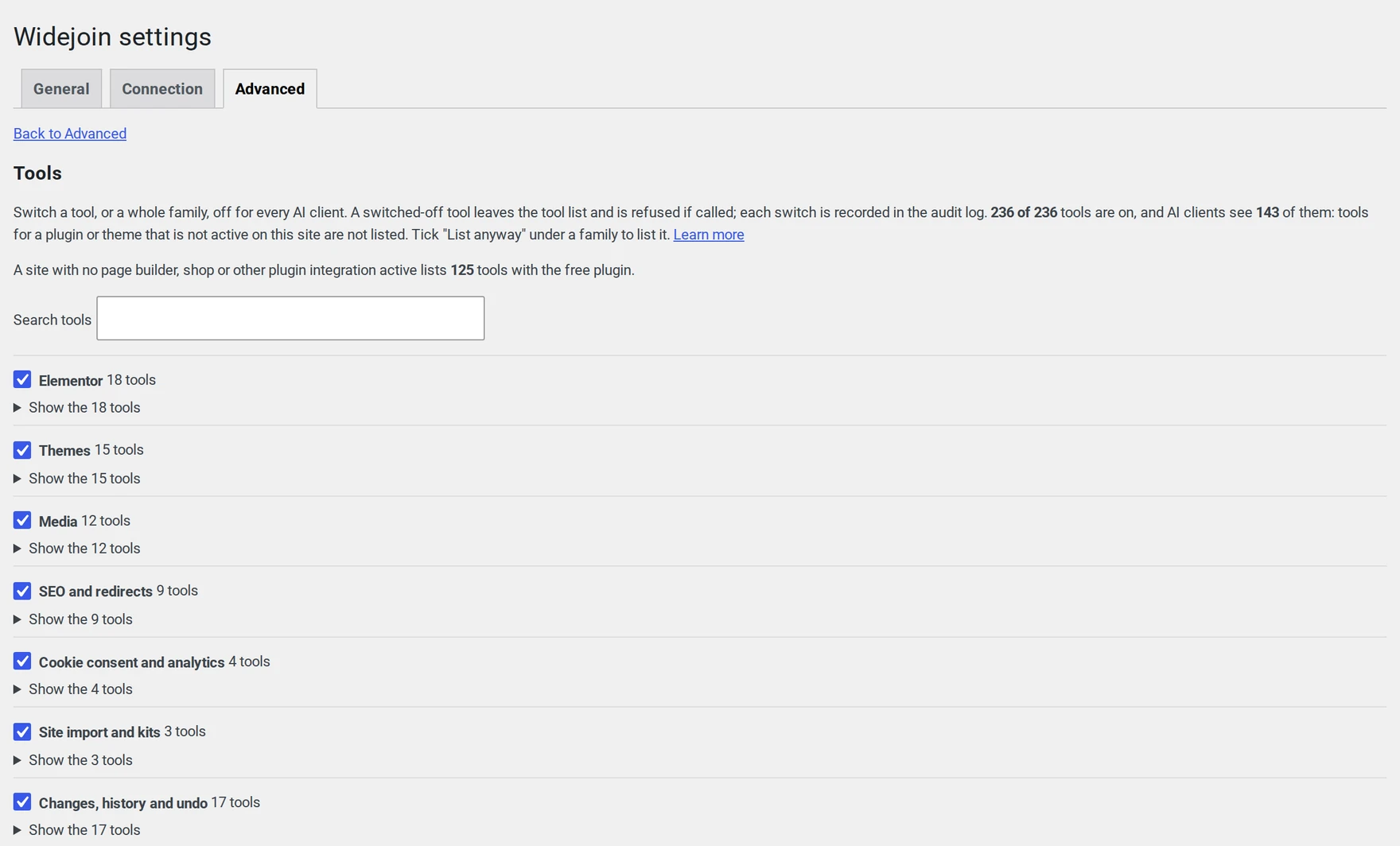
Add ?tools=compact to your Widejoin MCP address. Your client then sees three tools in place of the full list: find-tools, describe-tool and call-tool. Nothing else changes. A call made through call-tool is checked exactly like a direct call, so a write that needs your approval in wp-admin still waits for it, and the call counts against the same rate limit. To list fewer tools on the site itself, a site administrator can switch single tools or whole groups off under Widejoin, Settings, Advanced, Choose tools.
How do I start using these tools?
Connect a site and your MCP client, then ask in plain words, and your agent picks the tools. The Connect a site guide has the steps. Claude Code was tested in the real app. For 15 other named clients we ran a test client with the config format each app uses, against a lab gateway; the apps themselves were not run.
Point your agent at a client site today.
14 days of Pro on up to 10 sites. No card. Connect your client and ask for a page in the builder you already use.