WooCommerce MCP: product, price and stock changes from your AI agent
Can an AI agent change WooCommerce products through MCP?
Widejoin lets your AI agent draft WooCommerce products, and each price, sale or stock change keeps a record and a restore, while order totals and refunds stay out of its reach. Bulk price, tax, shipping and payment changes come with Pro from $99 a year. Tested on WooCommerce 11.1.2. A move to the trash waits for a person by default. It never changes an order's status, totals or refunds, and never touches payment keys.
14 days of Pro on up to 10 sites. No card.
Free plugin: 4 WooCommerce reads and 7 writes. Pro, $99 a year for 3 sites, adds 5 more WooCommerce writes.
On this page
- Does WooCommerce have its own MCP?
- What did we test?
- Can an AI agent change WooCommerce prices safely?
- Which WooCommerce tools does Widejoin have?
- What product fields can it change?
- How do you know the change reached the store?
- Can it see or change orders?
- What will it never do in WooCommerce?
- Should I start on a staging store?
- What should I ask the agent first?
- How did Direct mode do on a store?
- How do I undo a price change?
- How do I connect Claude Code or Cursor to a WooCommerce store?
- Questions
In a WooCommerce store your AI agent drafts products and changes regular prices, sale prices and stock through Widejoin. Each change is recorded, with a restore where one is possible. Orders, totals, refunds and payment keys stay out of its reach, and a product moved to the trash waits for a person by default, even in Direct mode.
Does WooCommerce have its own MCP?
Yes. WooCommerce registers its own product and order abilities, and the free MCP Adapter serves them to Claude Desktop, Claude Code or Cursor. WooCommerce calls it a developer preview, and WooCommerce 11.3 removed its older /wp-json/woocommerce/mcp endpoint (developer.woocommerce.com, read 27 October 2026). Widejoin adds a record and a restore for each price, sale or stock change, Review first for a person to approve them, and tools for 8 builders on the same site.
What did we test?
WooCommerce 11.1.2 on WordPress 7.1.2, on our lab on 25 and 26 September 2026: simple and variable products with up to 50 variations, categories, tags and gallery images, and order lists on both HPOS and legacy order storage. Each price, sale and stock change was checked in a separate signed-out browser, the way a shopper sees it.
Can an AI agent change WooCommerce prices safely?
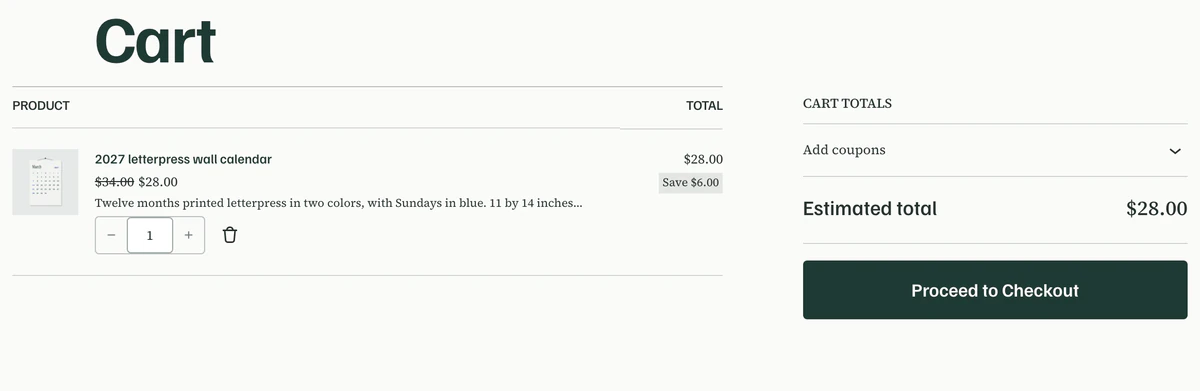
Yes. A price change runs every check an approval runs, as the agent's WordPress user, and keeps a record and an undo. In Direct mode it goes live in the agent's call; in Review first the price in your store stays the same until a person approves it. On our lab, on WooCommerce 11.1.2, with every change held for approval, a sale from 30.00 to 25.00 was invisible to a signed-out shopper until approval. Then the product showed the struck-through and sale prices, and the cart charged 25.00.
Which WooCommerce tools does Widejoin have?
16 tools: 4 that read and 12 that write. create-product-draft and create-variable-product-draft create unpublished product drafts at once. Prices, sales and stock change through the shared plugin field tools, read-integration and prepare-integration, each as a recorded change with an undo.
- Read:
list-orders,list-product-variations. - Write:
create-product-draft,create-variable-product-draft. - More store tools:
read-woo-store,read-woo-customers,prepare-coupon,prepare-order-note,prepare-product-attribute,prepare-woo-customer,prepare-woo-gateway,prepare-woo-settings,prepare-woo-shipping-zoneandprepare-woo-tax-rate.prepare-woo-customeredits names, billing and shipping addresses only, never payment data. A customer note fromprepare-order-noteemails the customer, so it cannot be restored. - Trash and bulk edits:
prepare-product-deletemoves a product to the trash, and restore brings it back while it is there. A move to the trash waits for a person by default, since deletes are on the site's ask-before list. It never deletes a product for good: you empty the trash yourself in WooCommerce > Products.prepare-product-bulk-editchanges prices, sale prices and stock for up to 100 products, with a dry run that shows the before and after table, and each product becomes its own change with its own undo.
What product fields can it change?
Regular and sale price, stock and stock status, variable products with up to 50 variations, categories, tags and the gallery, up to 20 images. New products are simple products only.
How do you know the change reached the store?
The test checks it the way a shopper would, in a separate signed-out browser: product page price, add to cart, cart total. A stock change to 0 showed "Out of stock" and removed the add-to-cart button. It works with block themes and classic themes.
A fresh WooCommerce shows signed-out visitors a "coming soon" page until the store is launched. On our lab that page hid every storefront from the shopper checks, so the lab now turns it off before they run.
Can it see or change orders?
It can list orders. It never changes an order's status or totals and never refunds. It can also add an order note (a customer note emails the customer) and change a customer's name and billing and shipping addresses. Each summary has six fields: ID, status, total, currency, creation date and line-item count. Customer contact, address, IP and payment details are not returned. We tested this on both HPOS and legacy order storage. With the Pro add-on it can turn cash on delivery, cheque and bank transfer on, and any payment method off, and it never touches payment keys or account details.
What will it never do in WooCommerce?
Change an order's status or totals, refund orders, take payments, read or change payment account details and keys, or run raw SQL. Those are out of scope by design. Turning a payment method on or off and changing store settings, the checkout page among them, come as changes you approve in Review first, like a price change. In Direct mode a store settings change applies at once, and a payment method change waits for a person by default, because payment settings are on the site's ask-before list.
Should I start on a staging store?
Yes, if you have one. Try the first changes on a staging copy, then connect the live store. The agent acts as the WordPress user it connects as and never goes beyond what that user may do, so give it a user whose role covers only the work you want from it. To approve each change before it reaches shoppers, set the site to Review first.
What should I ask the agent first?
These are the calls our lab made, written the way you might ask for them:
- "List my recent orders." Each summary came back with six fields: ID, status, total, currency, creation date and line item count, with no customer contact or payment details.
- "Put this product on sale at 25.00." Once approved, the product page showed 30.00 struck through next to 25.00, and the cart charged 25.00.
- "Set its stock to 0." The product showed "Out of stock" and lost its add to cart button.
- "Undo the last two changes." Restoring the stock and then the sale brought back the add to cart button and the original price.
How did Direct mode do on a store?
On 23 October 2026 a fixed script of MCP calls, with no AI model in the loop, set up a ten product WooCommerce store in Direct mode. It took 38 tool calls and 13 seconds. The store settings, the products and their publishes applied inside the agent's own calls, and one change waited for a person: the install allowlist, an administrator's setting. One gap is an open bug: the answer for each new product category carried no category ID, so the ten products stayed uncategorized.
How do I undo a price change?
In Direct mode the agent undoes it with one restore-change call. A person can restore it from the change's page in wp-admin. On the lab, restoring the stock and then the sale brought back the add-to-cart button and the original 20.00 price.
How do I connect Claude Code or Cursor to a WooCommerce store?
- Install the Widejoin plugin on the store. Store settings, shipping zones, tax rates, bulk edits and payment methods need the Pro add-on.
- Sign up at https://widejoin.com/sign-up and make a token on the Tokens tab of Settings.
- Point your AI client at https://widejoin.com/mcp with that token. The connect guide has the setup for each client, and Claude Code has its own page.
Related: the Elementor integration, the Gutenberg integration, all integrations and the install docs.
Questions
Can the agent change prices without my approval?
Yes, in Direct mode, the default on a new install. A price or sale change then applies at once as the agent's WordPress user, with a record and an undo. Switch the site to Review first, or have the agent ask for review on that call, and each change waits for a person in wp-admin instead.
Can it refund or edit an order?
No. Order status, totals and refunds never change, and Widejoin never takes payments or touches payment keys. It can turn a payment method on or off, and that change waits for a person by default.
Does it see my customers' details?
No. Order summaries leave out contact, address, IP and payment fields.
Does it work with variable products?
Yes. Attributes and variations were tested on our lab.
Which WooCommerce version did you test?
WooCommerce 11.1.2 on WordPress 7.1.2. Later versions are not tested yet.
Does it work on WooCommerce 11.3?
We have not run it on 11.3 yet. Our lab runs WooCommerce 11.1.2, and later versions are not tested. The endpoint that 11.3 removed is WooCommerce's own, and Widejoin does not use it.
Is there a WooCommerce MCP server on GitHub?
WooCommerce's own MCP is part of WooCommerce, not a separate server: the free MCP Adapter serves its abilities, and WooCommerce calls it a developer preview. MCP directories also list WooCommerce servers from other developers, which we have not run.
Which AI clients can manage a WooCommerce store?
The clients on the connect guide, each with its test status. They all reach the store through the same Widejoin tools and the same records.
Point your agent at a client site today.
14 days of Pro on up to 10 sites. No card. Connect your client and ask for a page in the builder you already use.