WordPress MCP not working? Every error we hit, and the fix
When an AI client cannot connect to WordPress through Widejoin, start with one test request: it shows whether the problem is the address and token or the client's own settings. Below is every error we hit while testing, from HTTP 401 and "Session not found" to missing tools and refused writes, each with the message you will see and the fix that worked.
Free to start. No credit card.
On this page
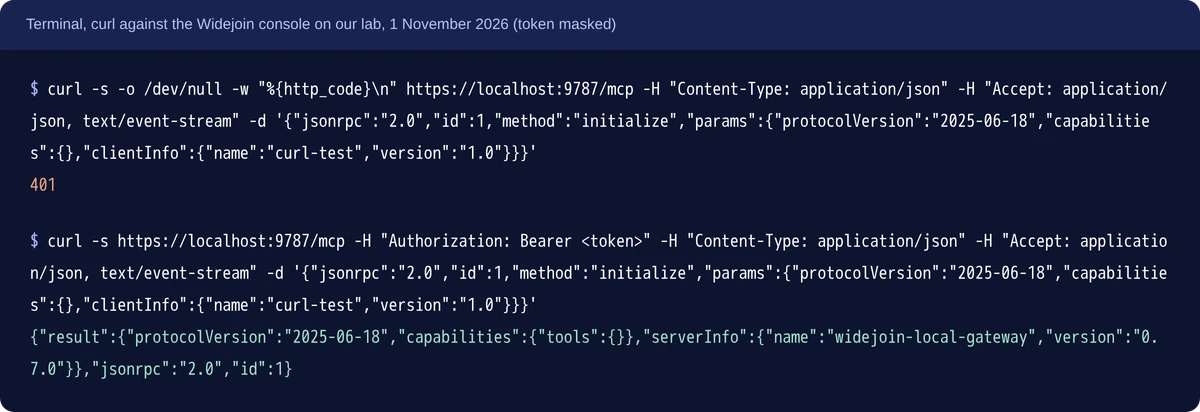
- Where do I start when a connection fails?
- Why do I get HTTP 401 Unauthorized?
- Why do I get "Session not found: Invalid or expired session"?
- Why does Widejoin show no tools after the update?
- Why are most tools missing?
- Why does the connection work but every call fail with authentication errors?
- Why is my request refused as too large?
- Why did my agent stop with a limit message?
- Why does a tool say it is not available on this site?
- Why are writes refused with "unsupported_version"?
- Why are SEO changes refused?
- Why did my change wait instead of applying?
- Why was approval refused?
- Why does my AI client show fewer tools than Widejoin offers?
- Which client settings trip people up?
- Questions
Where do I start when a connection fails?
Run the test request from the Connect your AI client guide before you touch your client's settings. It sends one MCP initialize request with your token. If it fails, the problem is the address or the token; if it works, the problem is in the client's configuration.
Why do I get "Session not found: Invalid or expired session"?
The MCP session your client opened is gone. The full error is JSON-RPC code -32005 with HTTP 404. Widejoin's gateway already repeats the call once on a fresh session when this happens, so if you still see it, reconnect your client and try again.
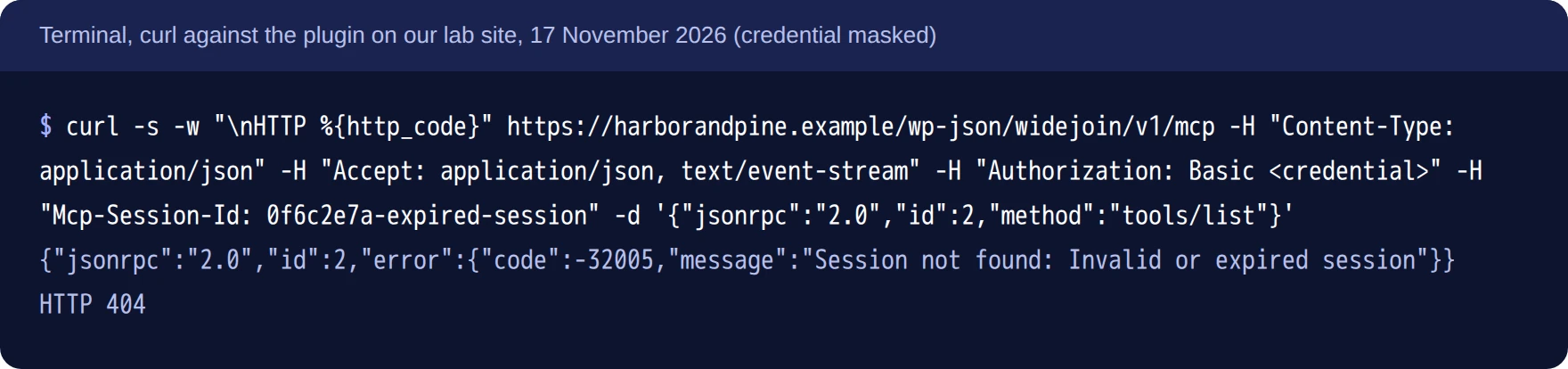
We hit this on our own test runs. It happened when several clients opened their first connection to a site at the same moment, for a user who had no sessions yet. The WordPress MCP Adapter could then store only one of the new sessions, and the others failed on their next call. Before our fix, 21 of 120 clients failed in our concurrency test; with it, 0 of 240. The fix is in the plugin from 0.7.1, so update the plugin if you still see this. On an older plugin, connect one client at a time to a fresh site.
Why does Widejoin show no tools after the update?
From 0.7.0, Widejoin turns on its MCP server only when the MCP Adapter that loads is at 0.7.0 or later and below 0.8.0. From 0.7.9 it also takes 0.6.2, the copy Hostinger AI bundles: on a Hostinger site with Hostinger AI active, that copy always loads first and Widejoin uses it. Otherwise it serves no tools, and wp-admin shows a notice to administrators that names the cause and links to the fix.
A plugin from before the rename answers only at /wp-json/sitebridge/v1/mcp. After the update both addresses work, so saved client settings keep connecting; new set-ups print /wp-json/widejoin/v1/mcp.
The MCP Adapter is not installed or not active. Click Install MCP Adapter in the notice, or search for "MCP Adapter" in Plugins > Add New, then install and activate it. On a site with no assistant yet, Create connection on the Widejoin screen installs or activates it inside that click.
The Adapter is older than 0.6.2 (from 0.7.9; before that, older than 0.7.0). Update MCP Adapter in Plugins. If the notice names another plugin, that plugin loads its own older copy of the Adapter; check Plugins for an update to it.
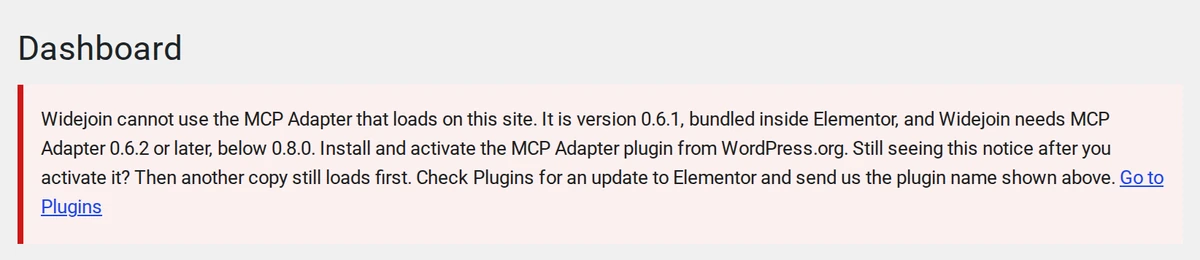
The notice when another plugin loads an older Adapter, here the copy bundled inside Elementor, with the MCP Adapter plugin turned off. The Adapter is 0.8.0 or later. Widejoin does not support that version yet. Update Widejoin when a version for that Adapter is out, or go back to an MCP Adapter below 0.8.0.
Why are most tools missing?
The site runs a WordPress version below 6.9 with an older Widejoin build, 0.6.1 or earlier, installed before 6.9 became the minimum. There Widejoin serves only the update tools, because the other tools need the Abilities API, which is part of WordPress core from 6.9. wp-admin says the plugin is in update-only mode. Update WordPress to 6.9, install the MCP Adapter plugin 0.7.x, then update Widejoin, and every tool appears.
Why does the connection work but every call fail with authentication errors?
Some hosts drop the Authorization header before WordPress sees it. The connection-diagnostics tool reports how the request was authenticated. If the header was stripped, send the same value in X-Widejoin-Authorization instead. Use the fallback only then, because proxies and log tools usually mask Authorization but not custom headers.
Why is my request refused as too large?
Widejoin refuses requests over 2 MB with HTTP 413. Split a large page or a long batch into smaller changes.
Why did my agent stop with a limit message?
It reached your plan's daily tool call allowance, or the per-minute brake. At the daily cap the message says calls stop until 00:00 UTC; your sites keep working and nothing extra is charged. A day with as many failed calls as the allowance stops the same way. The per-minute message asks the agent to wait before retrying, and that brake counts every call, failed or not. From 80% of the daily cap, every tool reply says how many calls are left.
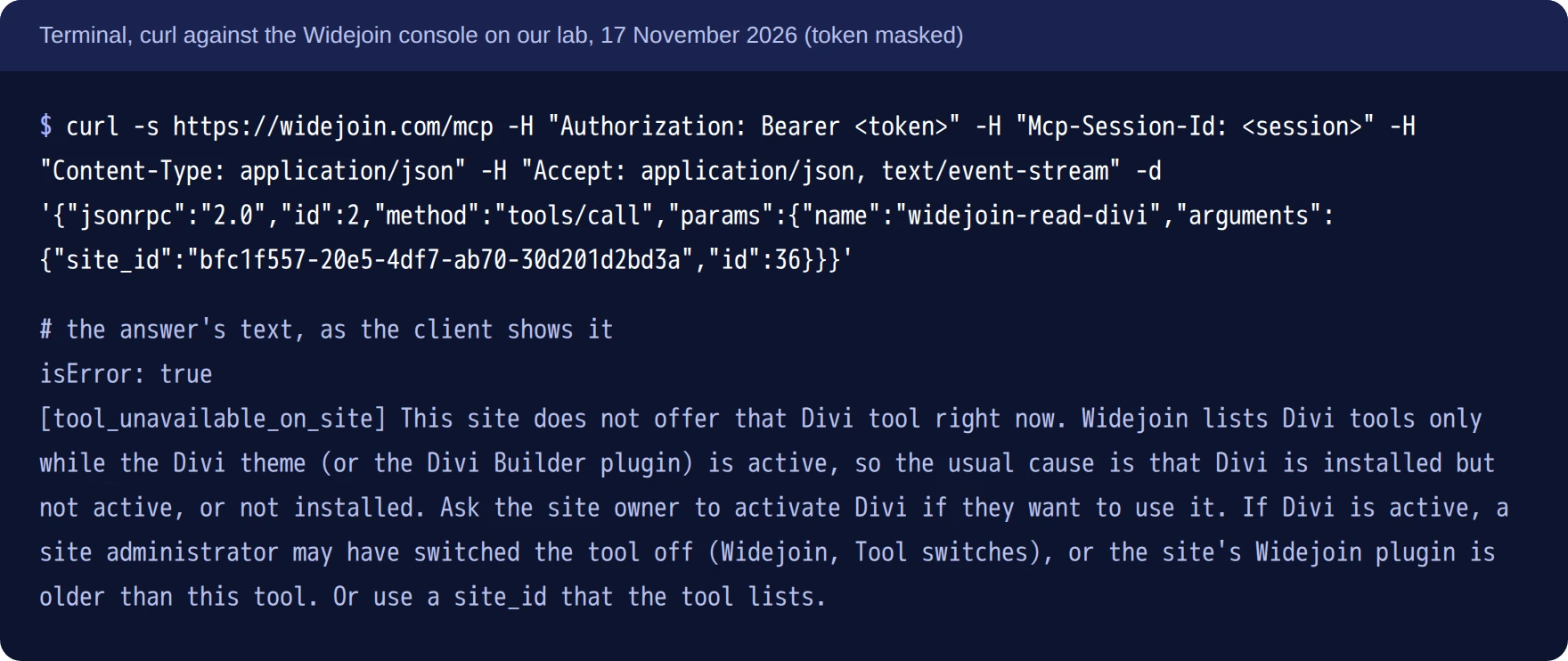
Why does a tool say it is not available on this site?
Each site offers the tools its own Widejoin plugin provides, so two sites can list different tools. The error is tool_unavailable_on_site. It usually means the site runs an older plugin version, or the plugin a tool works with is not active there.
Why are writes refused with "unsupported_version"?
The site runs a major version of a builder or plugin we have not tested, for example Bricks 3 where we tested Bricks 2.x. Widejoin keeps reading it but refuses writes. The integrations tool reports the installed version and whether it is writable.
Why are SEO changes refused?
Two SEO plugins are active. With Yoast, Rank Math or All in One SEO, one at a time is supported, and a second one blocks new SEO changes with seo_ownership_ambiguous. Deactivate one and the same change goes through.
Why did my change wait instead of applying?
On a site in Direct, the answer says status: pending with a queued_because code, a next_step and a review_url. The code says why:
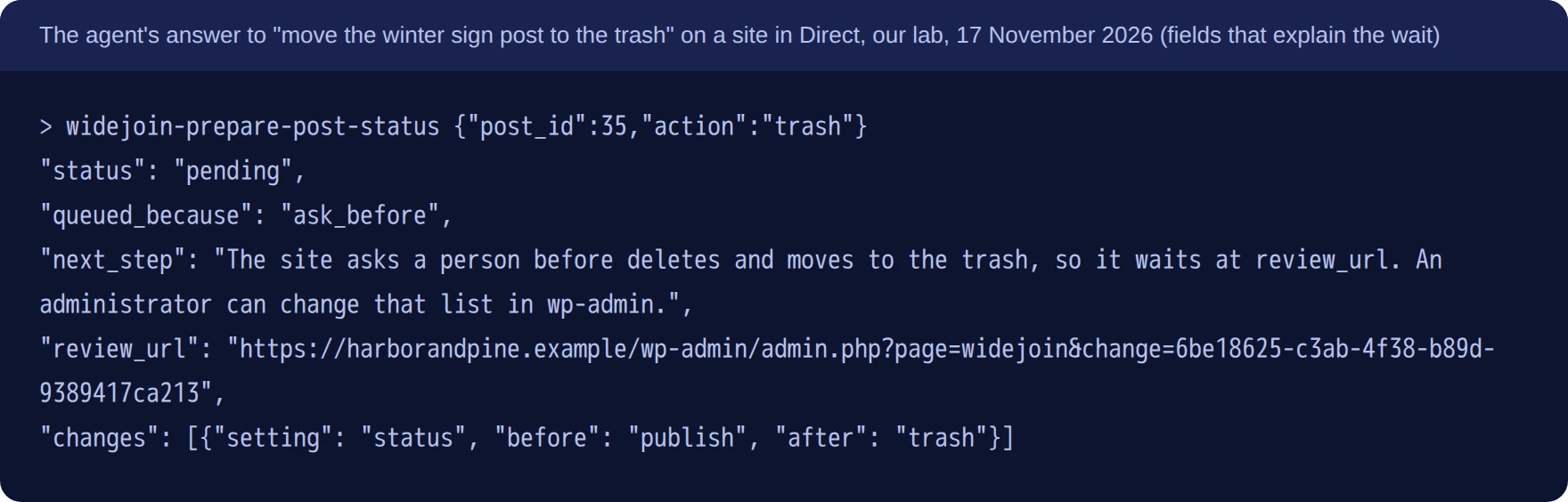
needs_capability: the agent's WordPress user may not make this change, so it waits for someone whose role may. If nobody on the site may, the change is closed withnobody_can_approve.needs_unfiltered_html: the change carries HTML, script, custom CSS or code, and the agent's user lacksunfiltered_html. A new First connect agent may not add code until an administrator allows it. A plain text, image or button edit in a page builder does not need it when the option "Let simple page builder edits go live at once" is on. It is on Settings, General.ask_before: the change is on the site's "Always ask first" list, such as a delete, a plugin activation or where form mail goes. An administrator can change that list on Settings, General, under "When changes go live".daily_cap: the daily limit for "Always ask first" kinds and bulk replacements is reached (50 by default).content_filtered: WordPress's content filter changed markup the agent sent. Send the content without that markup and it goes through.post_locked: someone has the post open in the editor. It can be approved once the post is free.review_requested: the agent sentreview: true.multi_step,not_restorable,admin_setting,admin_role: update plans, other plugins' abilities, the Build install allowlist and role grants that add code or admin rights, and changes to an administrator's account, always wait for a person in Direct.long_operationwith statusrunning: a core update, a plugin data upgrade, a site import, a plugin install or update, or a bulk replacement of more than 50 items runs as a background job on WordPress's cron. Read change-status again in a minute.
Approving, declining and undoing are free on every plan. Update plans, core updates, plugin data upgrades, the site import, bulk replacements and plugin and theme updates are Pro tools; Widejoin pricing lists what the free plugin includes.
On a site in Review first, every change waits; that is the setting, not an error. Review first and the review inbox has the full list.
Why was approval refused?
The page changed after the change's page loaded, or after the agent made the change. The change's page says Not applied, names what was edited (for example "The page was edited after this proposal.") and confirms nothing was changed. Decline the proposal there, or ask the agent to make it again against the current page.

Why does my AI client show fewer tools than Widejoin offers?
Some clients cap tools. Windsurf allows 100 tools in total across all servers, and Widejoin offers up to 236 on a site with the free plugin and 71 more with Pro. Claude Code warns when one tool's output passes 10,000 tokens and stops at 25,000 by default; its MAX_MCP_OUTPUT_TOKENS setting changes that cap for large page reads.
Which client settings trip people up?
- Claude Desktop: it needs Node.js 18 or later for the mcp-remote bridge, and a full quit and reopen after you edit the config. Put the token in the
envblock and reference it in the header, which avoids spaces in the arguments. - claude.ai and the Claude Desktop Connectors screen: a custom connector there signs in with OAuth. The token in a request header did not connect when we tried it, and Claude's Request headers field is in beta for a limited set of organizations. Add
https://widejoin.com/mcpas a custom connector, choose Register automatically under OAuth client, and sign in to Widejoin when the app asks. We have not completed that sign-in from the real app yet, so Claude Code and the Claude Desktop config file are the tested routes. - ChatGPT: it signs in with OAuth and has no field for a token. Under Plugins, add
https://widejoin.com/mcpas a custom MCP server and sign in to Widejoin. We have not completed that sign-in from ChatGPT yet, so Codex CLI is the OpenAI route on our tested list. - Cline: set
"type": "streamableHttp", or it falls back to the older SSE transport. - Cursor: remote servers do not read an
envFile, so the header goes in~/.cursor/mcp.json. Its value can still come from your environment with${env:NAME}, as in"Authorization": "Bearer ${env:WIDEJOIN_TOKEN}". - OpenCode: it waits 5 seconds for a server's tool list by default.
- Application Passwords missing: if the section is missing from a user's profile, the site may not be on HTTPS, or a security plugin has switched Application Passwords off.
Still stuck? The security page has the contact address; tell us the client, its version and the exact error.
Next: install Widejoin step by step and undo an applied change.
Questions
What does JSON-RPC error -32005 mean?
The MCP session is no longer known to the server. Reconnect the client; Widejoin's gateway already retries once on a fresh session.
Why do I get 401 when the token is right?
The host may be stripping the Authorization header. Check with connection-diagnostics and use the X-Widejoin-Authorization fallback only if it was stripped.
Do failed calls use my allowance?
No. Only a tool call that runs and succeeds counts, and calls stopped at a limit never count.
Why can my agent read a plugin but not change it?
The site runs a major version we have not tested, so writes are refused with unsupported_version and reads keep working.
Point your agent at a client site today.
14 days of Pro on up to 10 sites. No card. Connect your client and ask for a page in the builder you already use.