Yoast MCP: SEO changes from your AI agent
Does Widejoin work with Yoast SEO?
Widejoin lets your AI agent edit Yoast SEO titles, meta descriptions and social tags in the free plugin, tested on Yoast SEO 28.7, each change recorded. Hosted Pro from $99 a year adds sites, calls and history.
14 days of Pro on up to 10 sites. No card.
Free plugin: both shared tools, read-integration and prepare-integration. Pro, $99 a year, adds hosted access for 3 sites, more calls a day and a longer change history.
On this page
- Which tools does Widejoin use for Yoast?
- Which Yoast fields does the agent write on a post?
- Which site-wide Yoast settings can it change?
- Can it add redirects in Yoast SEO Premium?
- What do Yoast's own permission settings decide?
- What did we find while testing?
- What stays in Yoast's own screens?
- How does restore work?
- Questions
Your AI agent can change Yoast SEO's fields on each post, its site-wide settings, a post's schema type and, on Yoast SEO Premium, its redirects, all through Widejoin. This page lists the Yoast fields each tool writes, what we checked on Yoast SEO 28.7, what Yoast's own permission settings decide and what stays in Yoast's screens.
Which tools does Widejoin use for Yoast?
read-integration reads a post's Yoast fields with a fingerprint, and prepare-integration writes them through Yoast's own WPSEO_Meta. After each write Yoast rebuilds its indexable for that post, the stored record Yoast prints the page's head from. Social tags use the same two tools with the seo-social kind.
Which Yoast fields does the agent write on a post?
- The SEO title and meta description.
- The focus keyphrase.
- The canonical URL, noindex and nofollow.
- The breadcrumb title, only while Yoast's breadcrumbs are on. With them off, Yoast drops that field, so the change is refused and says to turn breadcrumbs on first.
- The schema page type and article type, picked from Yoast's own list. Yoast gives article types only to post types that have an author.
- The Open Graph and X (Twitter) title, description and image.
Which site-wide Yoast settings can it change?
read-seo-settings and prepare-seo-settings write Yoast's options through WPSEO_Options::set: the title separator, the home page title and description, the title and description templates of each public post type, Open Graph and X cards on or off, the default share image and the home page share card, the organisation or person name, logo and website name, the XML sitemap switch, breadcrumbs, noindex for author, date and tag archives, and the Google, Bing, Yandex, Baidu and Pinterest verification codes. These need an administrator's rights, each verification code is a change of its own, and restore puts back only the keys a change touched.
What do Yoast's own permission settings decide?
Yoast's setting that restricts advanced settings for authors is on by default. While it is, the canonical, noindex, nofollow, breadcrumb title and schema fields need the wpseo_edit_advanced_metadata capability, and Widejoin applies the same rule as Yoast's editor: an agent user without it gets a refusal that names the capability. Title, description and social fields have no such check in Yoast.
What did we find while testing?
On sites moved to HTTPS, Yoast's og:image can still send the old http address of an image, even one an administrator chose. Widejoin added prepare-media-url-fix, which corrects up to 100 of those image addresses in one change that can be restored.
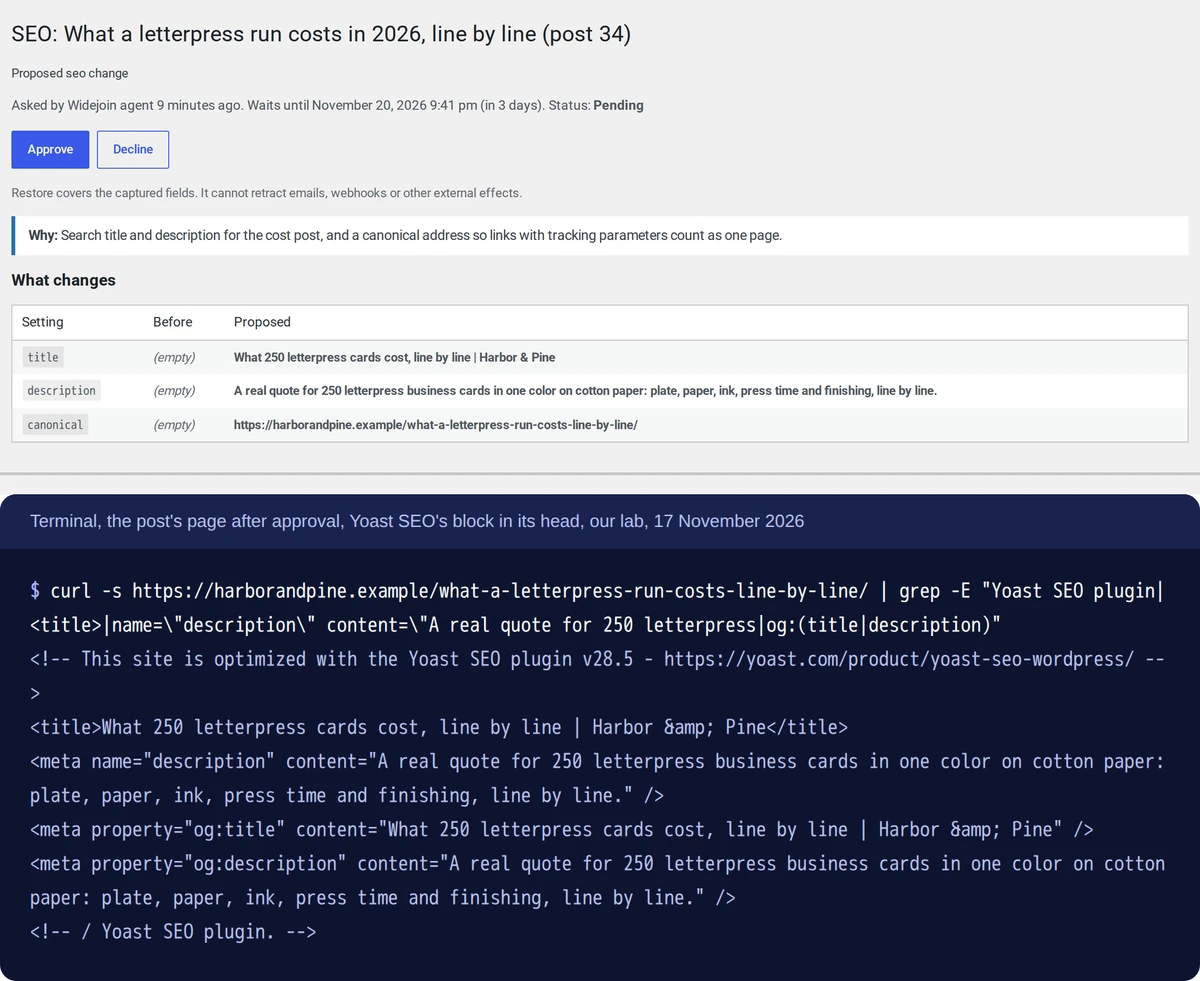
On 11 October 2026 we approved a title, description and canonical change on the Winter print sale page of our demo client site, and Yoast's block in the page source showed the new title and description. On 17 November 2026, on Widejoin 1.0.0, the same change on a post did the same, as the image above shows. In the 1.0.2 release checks on 23 November 2026, a home page title, a verification code and structured data reached Yoast's head on our lab, and restoring them gave back the head the site had before.
What stays in Yoast's own screens?
Custom JSON-LD: Yoast builds its schema graph itself and has no store for extra markup, so the agent can set a post's schema type but not add its own schema. Settings outside the list above stay in Yoast too. While a second SEO plugin is active, new SEO changes are refused and Yoast's data is left alone, and once the conflict clears a waiting change can be approved.
How does restore work?
Restore writes the previous values back through Yoast, after checking that Yoast still owns the page's SEO. If another SEO plugin took over after the change, restore is refused rather than writing to the wrong place. The restore guide covers the rest.
Related: the Rank Math integration, the All in One SEO integration, all integrations and Connect your AI client.
Questions
Which Yoast version did you test?
Yoast SEO 28.7, on WordPress 7.1.2.
Can the agent set a post's schema type in Yoast?
Yes. It picks the page type and article type from Yoast's own list. It cannot add custom JSON-LD, because Yoast builds its schema graph itself and has no store for extra markup.
Why was a canonical or noindex change refused on Yoast?
Yoast's setting that restricts advanced settings for authors is on, and the agent's WordPress user lacks wpseo_edit_advanced_metadata. Widejoin follows the same rule as Yoast's own editor.
Point your agent at a client site today.
14 days of Pro on up to 10 sites. No card. Connect your client and ask for a page in the builder you already use.