All in One SEO MCP: titles, descriptions, robots and social tags from your AI agent
Does Widejoin work with All in One SEO?
Widejoin lets your AI agent change All in One SEO titles, descriptions, robots and social tags, tested on All in One SEO 5.0.2, and each change keeps a record. These writes are in the free plugin, and hosted Pro from $99 a year adds sites, calls and history.
14 days of Pro on up to 10 sites. No card.
Free plugin: both shared tools, read-integration and prepare-integration. Pro, $99 a year, adds hosted access for 3 sites, more calls a day and a longer change history.
On this page
- Which tools does Widejoin use for All in One SEO?
- Which All in One SEO fields does the agent write on a post?
- What does All in One SEO keep out of reach?
- Which site-wide All in One SEO settings can it change?
- Which access controls does it follow?
- Were social fields tested on All in One SEO?
- How does restore work?
- Questions
Your AI agent can change All in One SEO's fields on each post, social tags included, and its site-wide settings through Widejoin, checked on All in One SEO 5.0.2. Schema and redirects are where it differs from Yoast and Rank Math, so this page says what the agent writes, what All in One SEO keeps to its own screens and why.
Which tools does Widejoin use for All in One SEO?
read-integration reads a post's SEO or social fields with a fingerprint, and prepare-integration saves them through All in One SEO's own savePost. All in One SEO keeps these values in a table of its own, not in post meta.
Which All in One SEO fields does the agent write on a post?
- The SEO title and meta description.
- The canonical URL.
- The robots setting, mapped to All in One SEO's three states: follow the site default, noindex, or index. Nofollow applies only when the post does not follow the default.
- The focus keyphrase, written to both places All in One SEO 5 keeps it.
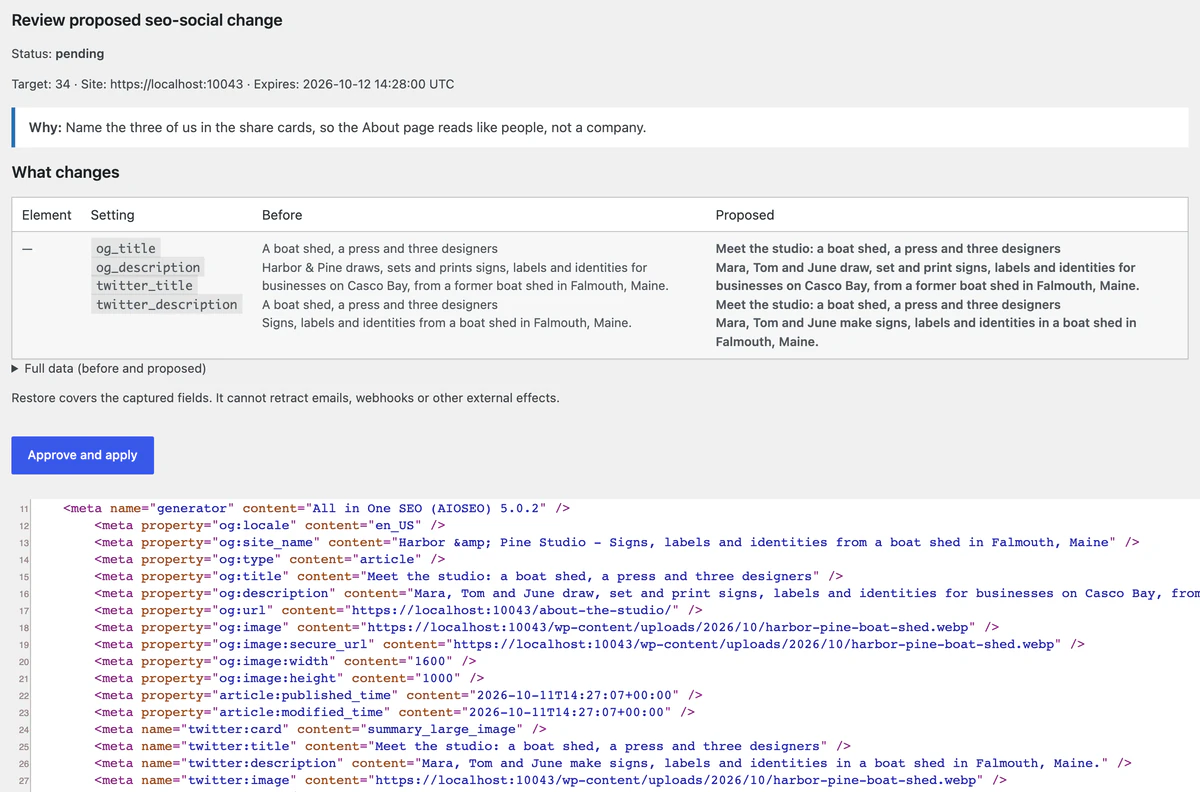
- The Open Graph and X (Twitter) title, description and image. All in One SEO stores an image as an address, so images must come from your Media Library.
An empty value returns a field to the site-wide default rather than storing a blank.
What does All in One SEO keep out of reach?
Two fields Yoast and Rank Math store per post. The breadcrumb title is refused, because All in One SEO keeps breadcrumb labels only in its Pro version. A schema type is refused too, because All in One SEO keeps a schema graph for each post rather than one type, and prepare-seo-schema refuses All in One SEO with that reason. Schema stays in its Schema Generator.
Redirects are the other gap. prepare-redirect works with the Redirection plugin, Rank Math and Yoast SEO Premium, and All in One SEO's own redirects are not among them, so on an All in One SEO site, install Redirection and the agent adds redirects through it.
Which site-wide All in One SEO settings can it change?
read-seo-settings and prepare-seo-settings write through All in One SEO's own options objects and its type checks: the title separator, the home page title, description and share card, the title and description templates of each public post type, Open Graph and X on or off, the default share image and X card type, the organisation name, logo and website name, the sitemap switch, the breadcrumb separator and home label (the free version has no breadcrumbs switch), noindex for author, date and tag archives, and the five verification codes. These need an administrator's rights. In the 1.0.2 release checks on 23 November 2026, a home page title and description set this way reached the front page head on our lab, and restore gave the old head back.
Which access controls does it follow?
All in One SEO's own. A field on the General, Advanced or Social tab of its post settings needs aioseo_page_general_settings, aioseo_page_advanced_settings or aioseo_page_social_settings, checked when a change is proposed, approved and restored, so it holds for whoever applies it.
How does restore work?
Restore writes back the previous values, through All in One SEO again. If another SEO plugin has taken over, restore is refused, and so is approving a change still waiting in Review first; while two SEO plugins are active, new SEO changes are refused. The change's page in wp-admin says what restore covers: "Restore covers the captured fields. It cannot retract emails, webhooks or other external effects."
Related: the Yoast SEO integration, the Rank Math integration, all integrations and the restore guide.
Questions
Which All in One SEO version did you test?
All in One SEO 5.0.2, on WordPress 7.1.2.
What does an empty title do?
It returns the field to All in One SEO's site-wide default rather than storing a blank.
Can the agent change schema in All in One SEO?
No. All in One SEO keeps a schema graph for each post rather than one schema type, so schema stays in its Schema Generator.
Point your agent at a client site today.
14 days of Pro on up to 10 sites. No card. Connect your client and ask for a page in the builder you already use.