Claude and WordPress: connect Widejoin to Claude Code or Claude Desktop
How do I connect Claude to WordPress?
Install the free Widejoin plugin and the MCP Adapter plugin, connect the site in the Widejoin console, then point Claude Code or Claude Desktop at https://widejoin.com/mcp with a console token. Claude can then read and edit your pages, posts, media and SEO fields through WordPress itself, and each change is recorded. claude.ai's custom connector signs in with OAuth, which the hosted server offers, but we have not completed a sign-in from claude.ai yet.
14 days of Pro on up to 10 sites. No card.
read -rs WIDEJOIN_TOKEN
claude mcp add --scope user \
  --transport http widejoin \
  https://widejoin.com/mcp \
  --header \
  "Authorization: Bearer $WIDEJOIN_TOKEN"
On this page
- Is there a Claude plugin for WordPress?
- Which Claude apps can connect today?
- How do I connect Claude Code to WordPress?
- How do I connect Claude Desktop to WordPress?
- Can I add it to claude.ai as a custom connector?
- What should I ask Claude first?
- What does Widejoin not do?
- What does it cost to connect Claude?
- Questions
Is there a Claude plugin for WordPress?
Claude does not install anything on your site. Widejoin is the WordPress plugin on the other side: it runs an MCP server that Claude talks to, which is what people mean by a Claude MCP WordPress setup. The plugin is free and needs no account. It gives Claude typed tools for 8 page builders, WooCommerce and 4 SEO plugins, each tested on our lab (version 1.0.2, WordPress 6.9 or later, PHP 8.2 to 8.4). How it works shows what happens from request to restore.
Which Claude apps can connect today?
| Claude app | Works today | How |
|---|---|---|
| Claude Code | Yes | One claude mcp add command |
| Claude Desktop | Yes | Config file with the mcp-remote bridge, Node.js 18 or later |
| claude.ai custom connector | Not tested yet | OAuth sign-in, not completed from claude.ai yet |
We ran Claude Code 2.1.296 on 10 October 2026 through the plugin route on our lab: a change, its approval and a restore. Claude Code has not run against the console address yet. On our lab, Claude Desktop 2.31226.1 connected and listed the tools, and its full chat workflow is still to check.
How do I connect Claude Code to WordPress?
With the console, it takes two plugins, a token and one command.
Install the plugin and the MCP Adapter. Upload and activate the Widejoin plugin, then install and activate MCP Adapter 0.7.x from WordPress.org. Without it, Widejoin serves no tools. On a Hostinger site with Hostinger AI active, the Adapter is already there.
Connect the site in the console. Add your site under Sites in the Widejoin console.
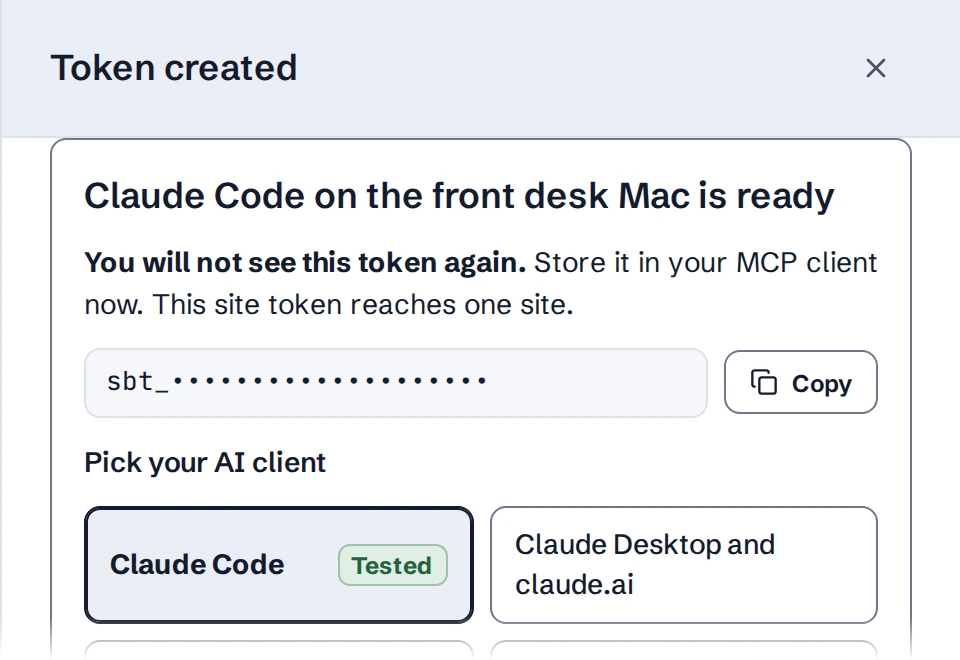
Create a token. On Settings > Tokens, create a token for Claude and copy it. It is shown once. A site token reaches one site, and on paid plans the account connection there reaches every site.
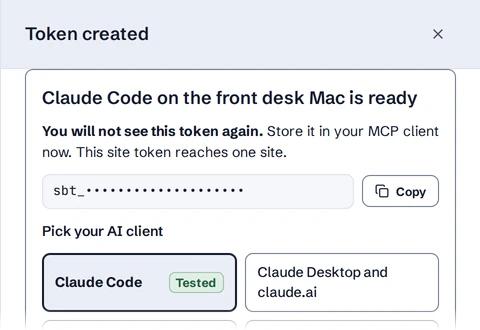
Illustration from our lab capture: a new token, shown once. The token is hidden and the panel's lower rows are faded out. Add Widejoin to Claude Code. Run the two commands below in a terminal. Paste the token when the first line waits for it.
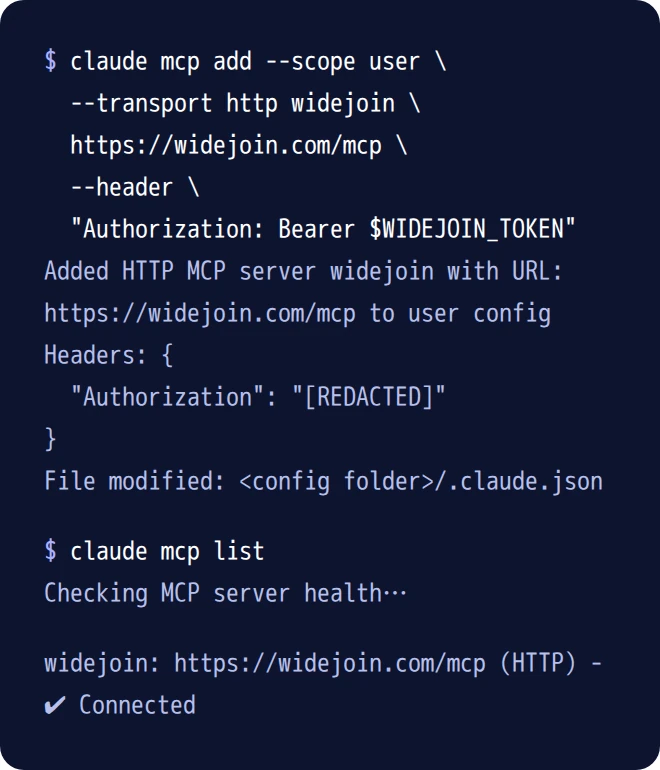
read -rs WIDEJOIN_TOKEN claude mcp add --scope user \ --transport http widejoin \ https://widejoin.com/mcp \ --header \ "Authorization: Bearer $WIDEJOIN_TOKEN"Check it. Run
claude mcp list. The widejoin entry should show as connected.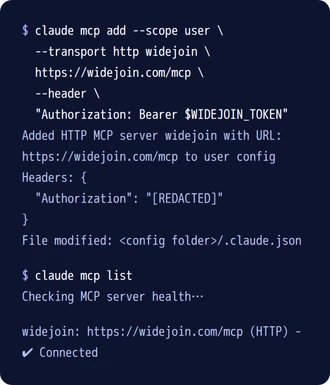
Illustration, set by us from a real Claude Code 2.1.322 run on our lab: widejoin reports as connected. The lab's address is replaced with widejoin.com and the add command is split over lines.
The first line reads the token without showing it, so it stays out of your shell history.
Widejoin does not support Adapter 0.8.0 and later yet. If your host blocks plugin installs, or Claude lists no Widejoin tools, the install guide covers the Adapter step by step.
--scope user makes Widejoin available in every folder. Without it, Claude Code adds the server to the current project folder only. The Claude Code page covers what we tested and what we did not.
How do I connect Claude Desktop to WordPress?
Claude Desktop connects through its config file, which runs Widejoin through the mcp-remote bridge. You need the plugin, the Adapter and the token from steps 1 to 3 above, and Node.js 18 or later.
Open the config file. Install Node.js 18 or later first if this computer does not have it. Then open Settings from the Claude menu in your system's menu bar (not the settings inside the Claude window), go to the Developer tab and click Edit Config. That opens
claude_desktop_config.json: on macOS in~/Library/Application Support/Claude/, on Windows in%APPDATA%\Claude\and on Linux in~/.config/Claude/.Add Widejoin. Add this entry under
mcpServers, with your token in place of<token>:"widejoin": { "command": "npx", "args": [ "-y", "mcp-remote", "https://widejoin.com/mcp", "--header", "Authorization:${WIDEJOIN_AUTH}" ], "env": { "WIDEJOIN_AUTH": "Bearer <token>" } }Save the file and restart. Save
claude_desktop_config.json, then quit Claude Desktop completely and open it again. Closing the window is not enough.Allow the tools. Claude Desktop asks you to allow each Widejoin tool the first time it uses it.
The token sits in plain text in that file, so keep the file to yourself.
Can I add it to claude.ai as a custom connector?
Not tested yet. On 2 November 2026 we tried to connect claude.ai to https://widejoin.com/mcp with a request header, and it did not connect, because claude.ai's custom connectors sign in with OAuth. Anthropic's page now says the Request headers field for a fixed token is in beta for a limited set of organizations.
The hosted server offers the OAuth sign-in now, but we have not completed one from claude.ai yet. If you try it, Anthropic's page lists the choices in the Add custom connector dialog. Under Authentication, choose Sign in now. Under OAuth client, choose Register automatically. The hosted server does not support the option Claude marks as recommended, Use Claude's published identity, yet. Custom connectors work on Free (one connector), Pro, Max, Ultra, Team and Enterprise; on Team and Enterprise an owner adds them.
The Connectors screen in Claude Desktop adds that same account connector. Until a sign-in from the real app passes, use the config file above, or Claude Code.
What should I ask Claude first?
Start with three read-only requests. They change nothing, and they tell you the connection, the user's role and the site are what you expect.
- "Use the widejoin-site-info tool and tell me the WordPress version, the theme and which page builder this site uses."
- "List the ten most recent pages with the widejoin-list-content tool and tell me which of them are drafts."
- "Run the widejoin-maintenance-inventory tool and list the plugins that have an update waiting."
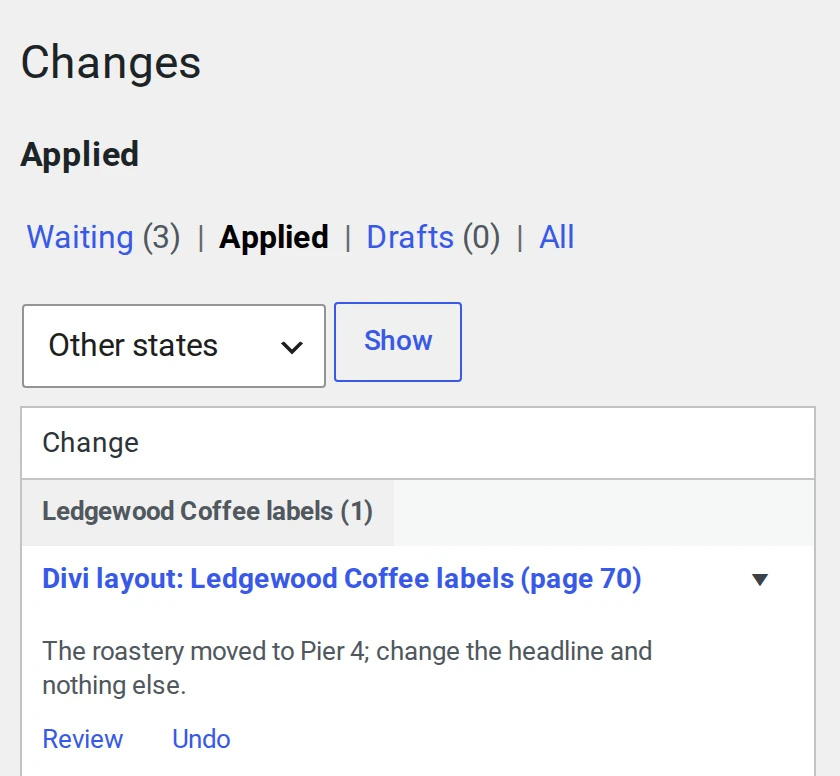
Then ask for one small change, such as a new draft page, and open the change in wp-admin to see what was recorded. For a whole site, the WordPress AI website builder page shows Harbor & Pine Studio before and after, a demo client site a Claude Code agent built on a Twenty Twenty-Five lab install on 11 October 2026. Can Claude build a WordPress website? is the full build log, with every tool call counted. Other lab write-ups are on the blog. On a site in Direct mode, the default for a new install, a change applies at once as the agent's WordPress user. Review first is a per-site option that makes every change wait for a person in wp-admin.
What does Widejoin not do?
It does not change WooCommerce order status, totals or refunds, run raw SQL, read or write arbitrary files, or support WordPress Multisite. It cannot undo WordPress core updates or plugin database upgrades. Claude Code warns when one tool reply passes 10,000 tokens and cuts it at 25,000 by default, so a large page read from a builder such as Elementor may need a smaller request, or a higher MAX_MCP_OUTPUT_TOKENS.
What does it cost to connect Claude?
The plugin is free. The hosted MCP server comes with every plan, Free included: 2 sites and 300 tool calls a day on Free. A new account can also try Pro free for 14 days on up to 10 sites, with no card. Try Pro free or start on Free. Pricing lists every plan.
When the trial ends, the free plugin keeps working on every site and the hosted server keeps your first 2 sites. Your Claude plan is billed separately by Anthropic; Widejoin's price covers Widejoin only.
Questions
Is there a Claude plugin for WordPress?
Widejoin is a free WordPress plugin that runs an MCP server on your site. Claude Code and Claude Desktop connect to it, and Claude then reads and edits the site through typed tools. Each change is recorded and most can be restored.
Can I add it to claude.ai as a custom connector?
Not tested yet. claude.ai signs in to custom connectors with OAuth. The hosted server offers it, but we have not completed a sign-in from claude.ai yet. Use Claude Code, or Claude Desktop with the config file.
Do I need a paid Claude plan?
Your AI client is billed separately by its own provider. Widejoin's price covers Widejoin only.
What happens when the Pro trial ends?
The free plugin keeps working on every site and the hosted server keeps your first 2 sites. Pro tools go back to their free state until you buy a plan.
Can Claude work on a site that runs only on my computer?
Not through the console. It reaches your site over the internet, so a site that runs only on your computer has to use the plugin route, with Claude Code on the same computer. The connect guide names each step.
Point your agent at a client site today.
14 days of Pro on up to 10 sites. No card. Connect your client and ask for a page in the builder you already use.