Can Claude build a WordPress website? What a Claude Code agent built through MCP in 90 minutes
Yes. On 11 October 2026 a Claude Code agent built Harbor & Pine Studio, a demo client site with a shop and a blog, through Widejoin in about 90 minutes (the log ran 94, from 01:56:54 to 03:30:56 UTC) with 173 MCP calls. A person approved about 60 edits one by one in wp-admin and added three product categories by hand, and the build turned up 7 gaps we have since worked on.
To do this Claude needs a way into the site: Claude Code or another MCP client, plus a plugin or connector that gives it tools. Claude in a chat window with no connector cannot reach your WordPress site.
The build ran on 11 October, when every edit and publish waited for approval in wp-admin. Since 0.7.3 a new install starts in Direct: changes apply at once as the agent's own WordPress user, each with a record and an undo where one is possible. Holding edits for a person, as this build did, is a per-site option called Review first.
Key points
- 173 tool calls between 01:56 and 03:30 UTC, using 34 of the 164 tools Widejoin had then. 167 succeeded and 6 failed.
- The agent laid out 7 Elementor pages and 10 WooCommerce products, wrote 3 posts and uploaded 26 images with alt text.
- New drafts appeared at once. Edits and publishing waited for approval in wp-admin.
- A person still added three product categories by hand, and the build turned up 7 gaps.
Widejoin now has tools for 8 builders, WooCommerce and SEO plugins. How a WordPress AI agent changes your site walks through both modes.
Every number below comes from the build's call log, counted again on 15 October 2026.
14 days of Pro on up to 10 sites. No card.


On this page
- What did Claude build on WordPress?
- How did Claude connect to the site?
- Which Widejoin tools did Claude use?
- Which way should I connect Claude to WordPress?
- How do I connect Claude Code to my own site?
- Can Claude Code edit Elementor pages?
- What still needed a person?
- What went wrong in the Claude WordPress build?
- Is it safe to let Claude change a live WordPress site?
- How do I try this on my own site?
- Questions
What did Claude build on WordPress?
A real site with a shop, a blog and a custom header. Harbor & Pine Studio is a made-up three-person design studio that sells prints and paper goods: a demo client site, not a customer.
It started on a Twenty Twenty-Five lab install that held an Opening hours page and one product from earlier tests. The agent created 9 products, rewrote the 10th and redesigned Opening hours. The lab ran WordPress 7.1.2, Elementor 4.3.1, Elementor Pro 4.3.0 and WooCommerce 11.1.2.
| Part | What it made |
|---|---|
| Pages | 7 Elementor pages, including Home, About, Services, Journal and Contact, and a redesign of Opening hours |
| Shop | 10 WooCommerce products from $12 to $48 (9 created, 1 rewritten), each with an image and descriptions |
| Blog | 3 posts with featured images, categories and dates |
| Media | 26 images uploaded with alt text |
| Theme | Hello Elementor, with an Elementor Pro header, footer and Journal post template |
| Design | Kit colors, fonts, buttons and form fields; logo and favicon; a main menu |
| Forms | A Contact Form 7 enquiry form with a topic menu |
The kit uses spruce green #1E3A34, channel blue #2B54C4 and buoy yellow #F2BE22 on chart white #FAFBF9, with Familjen Grotesk for headings and Source Serif 4 for text. The home page opens on a wall of seven painted buoys, and all 28 graphics were made for the site, with no stock photos.
For an existing library with images that have no alt text, bulk alt text with an AI agent shows how the agent fixes up to 50 at once. To plan a build of your own, the WordPress AI website builder page covers which agents and page builders can do this today.
How did Claude connect to the site?
A Claude Code session drove the build through a small script on the official MCP TypeScript SDK client, which reached the site through the Widejoin console. It did not use Claude Code's own MCP connection.
We tested that separately. Claude Code 2.1.296 listed a site, created a draft, proposed an edit we approved in wp-admin, and then restored it.
Which Widejoin tools did Claude use?
34 of the 164. 113 of the 173 calls created or proposed something; the rest read or checked status. The most used, by the names they had then (since 1.0.0 every tool name starts with widejoin-):
| Tool | Calls |
|---|---|
upload-image |
26 |
read-elementor |
14 |
prepare-elementor-layout |
14 |
read-integration |
11 |
prepare-integration |
11 |
prepare-additional-css |
11 |
create-product-draft |
9 |
elementor-widget-schema |
8 |
create-elementor-draft |
8 |
get-content |
7 |
prepare-content |
7 |
It read before it wrote: 14 page reads for 14 layout edits. The Tools page lists every tool it has now.
Which way should I connect Claude to WordPress?
Pick by what Claude should be allowed to change. Four options lead the search results, and we read each source again on 18 November 2026. Widejoin is the fifth. It changes the site directly by default, and a site set to Review first holds every change for a person to approve in wp-admin.
| Route | What it can do | What it can't do | Source |
|---|---|---|---|
| Application Passwords | Read posts, save drafts and edit pages over the REST API, with no plugin | Hold a change for review: the password can do whatever that user can | Pootlepress, 14 May 2026 |
| WordPress.com connector | Read the site and, since March 2026, draft and publish posts and pages, with a switch per write tool; new posts start as drafts | Reach a self-hosted site without Jetpack, and from 1 December 2026 without a Jetpack AI or Complete plan. You confirm changes in the chat; its docs describe no review queue in wp-admin | WordPress.com, 20 Mar 2026; MCP docs |
| Build with WordPress, a Claude Code plugin made by WordPress.com | Build themes, plugins, custom blocks and online stores as code, with a guided site builder, a site auditor, and skills for WooCommerce and Jetpack; preview and deploy through WordPress Studio | Work on an existing live site's content: its page describes skills that write code and build sites, and says nothing about approving edits inside WordPress | Claude plugin page |
| An MCP plugin (Easy MCP AI) | Connect Claude over OAuth, optionally keep AI posts as drafts, log every action, hold a tool's calls for approval on a page on your site, restore updates from a change history | Undo from wp-admin: its docs say the Activity screen has no restore button, and a restore runs from the AI client with wp_history_apply | Themeisle docs; settings reference; change history |
| Widejoin | Typed tools for builders, WooCommerce and SEO plugins; changes apply at once as the agent's WordPress user, each with a record and an undo where one is possible; code and templates from a user who may not add code wait for an administrator, and a site set to Review first holds every change for approval in wp-admin | claude.ai's custom connector signs in with OAuth, which the hosted server offers, and we have not completed that sign-in from claude.ai yet. Claude Desktop uses its config file with the mcp-remote bridge | Connect guide |
For ChatGPT, read what works between ChatGPT and WordPress today. Weighing plugins? See Widejoin and WPVibe side by side on approvals and undo.
How do I connect Claude Code to my own site?
With an endpoint and a token from the Widejoin console. The Claude Code WordPress setup page has the requirements and the long version.
Connect the site in the console. Add it under Sites, then create a token for Claude Code on Settings, Tokens. It is shown once. A site token reaches one site, and on the trial and paid plans the account connection reaches every site.
Add Widejoin to Claude Code. Run the first line and paste your token, which stays out of your shell history. Then run the second line.
read -rs WIDEJOIN_TOKEN claude mcp add --scope user --transport http widejoin https://widejoin.com/mcp --header "Authorization: Bearer $WIDEJOIN_TOKEN"Check the connection. Run
claude mcp list. The widejoin entry should show as connected.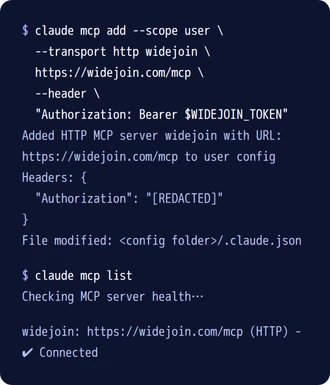
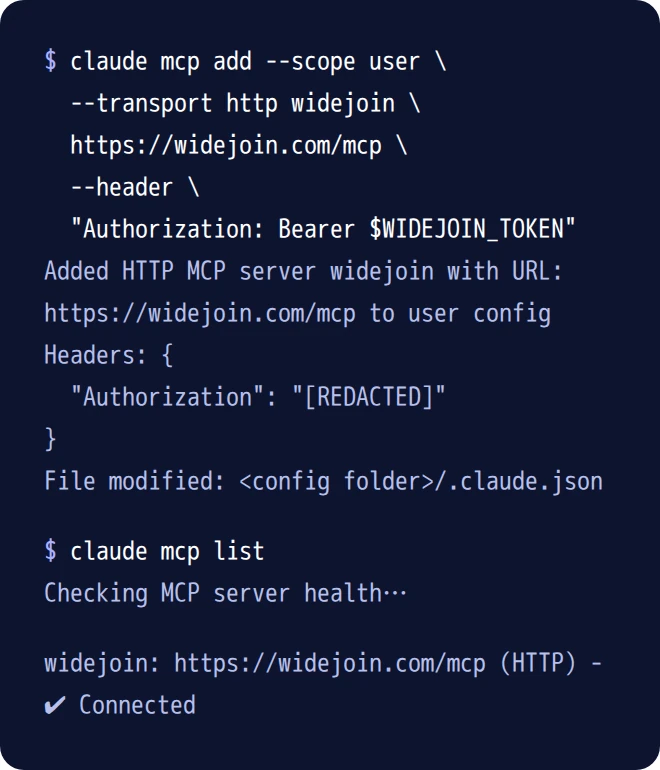
Illustration, set by us from a real Claude Code 2.1.322 run on our lab: widejoin reports as connected. The lab's address is replaced with widejoin.com and the add command is split over lines. Ask for a small draft. Claude Code asks before it runs a Widejoin tool until you allow it. Ask it to publish and, in Direct, the page goes live in the same call if the agent's user may publish. On a site set to Review first, open the review link it gives you and approve in wp-admin.
The Connect your AI client guide has the same steps for other clients.
Can Claude Code edit Elementor pages?
Yes, and Elementor page writes are in the free plugin. During the build the agent proposed 14 layout edits with prepare-elementor-layout, and the Elementor integration page lists all 25 Elementor tools. Elementor kits and theme parts, such as the header and footer this build made, are in Pro. Widejoin 1.0.1 fixed two Elementor edits for an agent connected as an Editor; the changelog has the details.
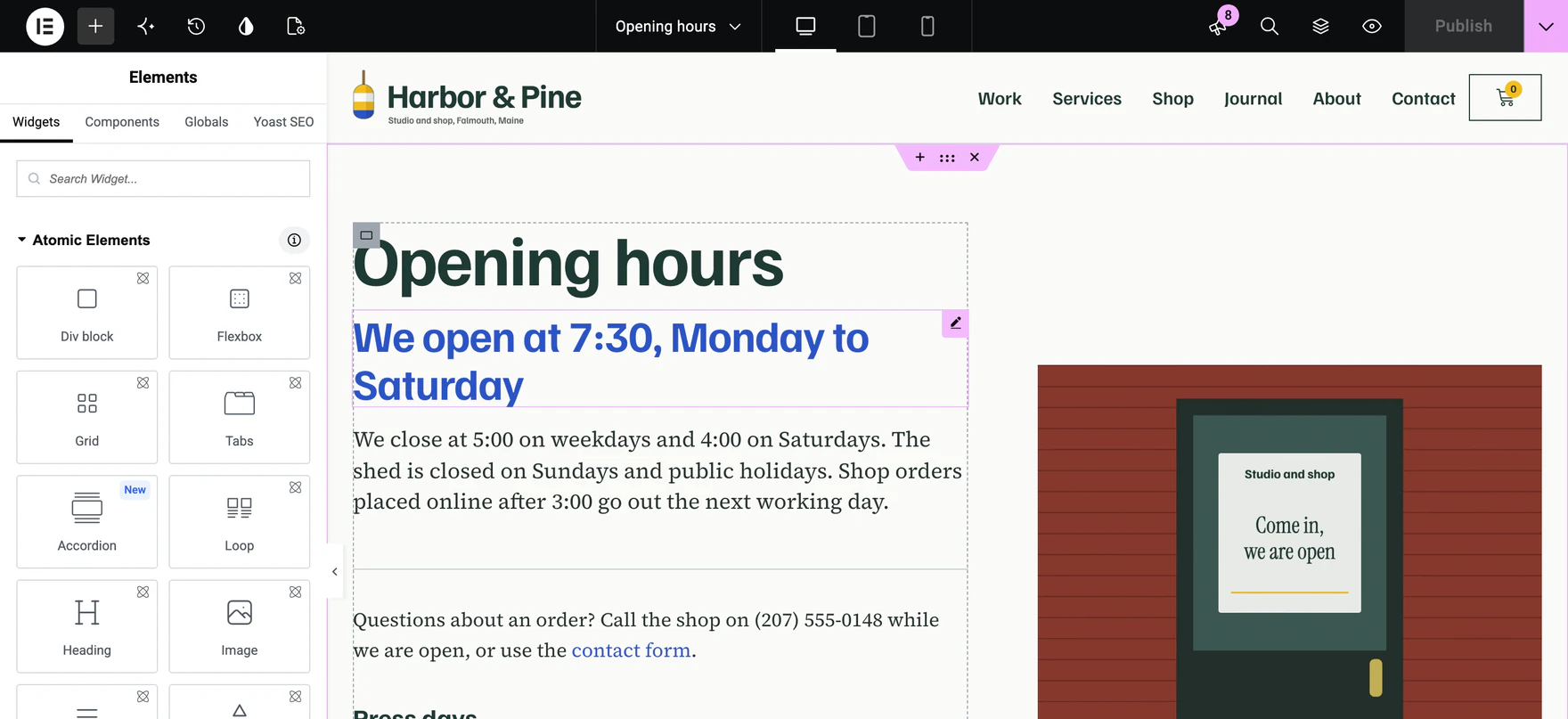
On the same lab that day, one reviewed edit changed the Opening hours heading from 8:00 to 7:30. After approval the page reopened in Elementor's editor with the new heading, and signed-out visitors saw 7:30.
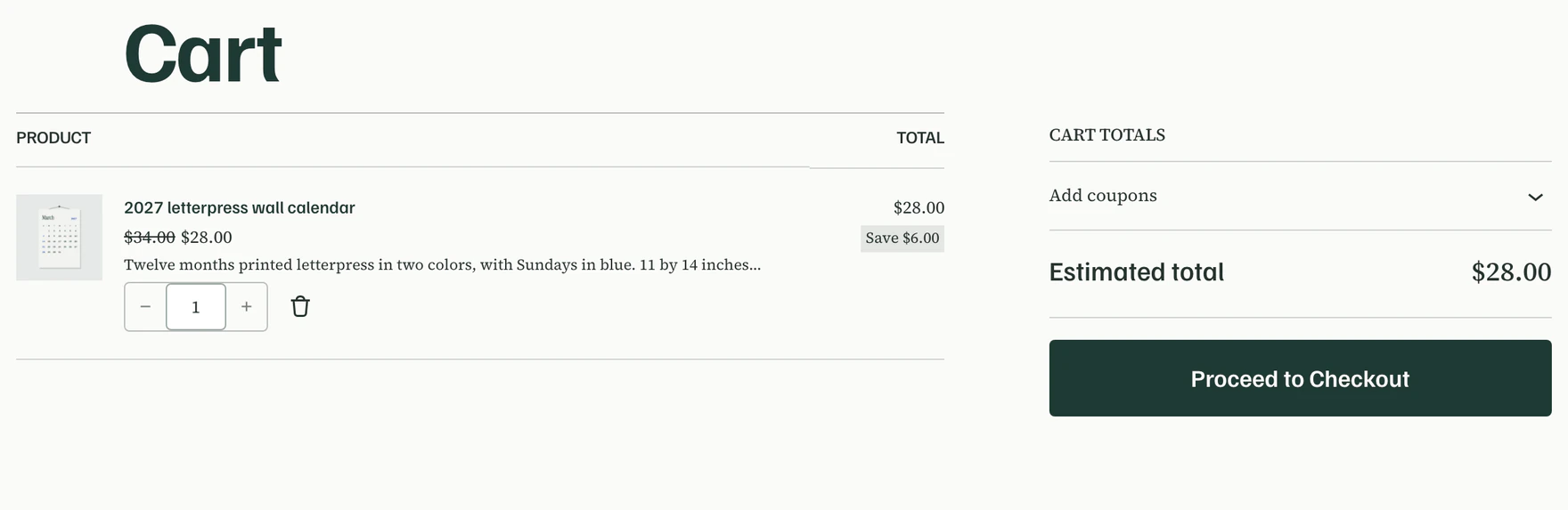
A WooCommerce edit went the same way. After an approved sale price on a wall calendar, the cart showed $34.00 struck through and charged $28.00. The WooCommerce integration page has the details.
What still needed a person?
Every edit and publish needed its own approval (gap 6 below). A person also added three WooCommerce product categories (Prints, Paper goods and Goods), because no tool created them then.
The first human step came under ten seconds in. At 01:57:03 UTC the agent asked to install Hello Elementor and got back not_allowlisted: the theme was not on the install allowlist, and an administrator could add it on the plugin's page. Someone did. The agent asked again at 01:58:52, and by 01:59:17 the log showed "Install theme Hello Elementor" as applied.
What went wrong in the Claude WordPress build?
Six calls failed, and each error said what to try next:
- The Hello Elementor install, refused until it was on the allowlist, as above.
- Two kit edits were refused because the site title, tagline, logo and icon belong to the site settings.
- Two post edits sent dates in the wrong format, and the tool asked for a UTC date.
- One theme template set a text color the widget does not have, and the tool pointed to the widget's schema.
The build also turned up 7 product gaps, which we logged to fix:
- No tool created WooCommerce product categories.
widejoin-prepare-termcreates them now. - Elementor Pro theme templates lose default dynamic content, such as the site logo, until it is set by hand.
- A wide image overflows its draft preview in wp-admin.
- The kit tool's error message names a tool that does not exist.
- No tool created or renamed a Contact Form 7 form.
widejoin-prepare-new-formandwidejoin-prepare-formdo that now. - Bulk approve covered only media text and SEO changes. It now covers page and post content and builder layouts too.
- The product description field is under-documented.
Is it safe to let Claude change a live WordPress site?
Start on a staging copy. Changes on a new install apply at once in Direct, never beyond what the agent's WordPress user may do. Deletes, plugin and theme installs and updates, users, form mail and payment settings wait for a person until an administrator turns that off. Set the site to Review first and every edit and publish waits for approval in wp-admin. In Direct, most changes undo with one restore-change call, but core updates and plugin database upgrades cannot be undone, and restore is not a full backup. What a WordPress rollback can and cannot undo covers updates in detail.
The agent's connection uses an Application Password marked Limited to Widejoin, which works only on the Widejoin endpoint; WordPress's own REST API and XML-RPC refuse it. Any other Application Password on the same user keeps its normal reach, so give the agent its own user with the lowest role that does the job. The security page covers the rest.
Widejoin reads WooCommerce orders but does not change them, payment method settings wait for a person by default, and it does not run on Multisite.
How do I try this on my own site?
Connect Claude Code with the two lines above, ask it to change one heading on a staging copy, then ask it to undo that change. The plugin is free; kits, theme parts and the other Pro tools come with the 14 day Pro trial on up to 10 sites, with no card. Our blog has the other write-ups from this lab.
Questions
Can Claude build a WordPress site?
Yes. On our lab a Claude Code agent built a demo client site with a shop and a blog in about an hour and a half, through 173 Widejoin tool calls. A person approved about 60 edits in wp-admin and added three product categories by hand.
Did the agent use Claude Code's own MCP connection?
No. The Claude Code session called Widejoin through a script on the official MCP TypeScript SDK client. Claude Code's own connection was tested separately, with version 2.1.296.
How many approvals did the build need?
About 60, approved one by one, because the site waited for a person on every edit and bulk approve then covered only media text and SEO changes. A site in Direct today asks a person mainly about deletes, plugin installs and updates, users, form mail and payment settings.
What could the agent not do?
Create WooCommerce product categories or a new Contact Form 7 form. A person did those in wp-admin. Both have tools now.
Does it work with claude.ai or the Claude desktop app?
Claude Desktop connects through its config file and the mcp-remote bridge. claude.ai's custom connector signs in with OAuth, which the hosted server offers; we have not completed that sign-in from claude.ai yet. Claude Code is the route we tested end to end.
Point your agent at a client site today.
14 days of Pro on up to 10 sites. No card. Connect your client and ask for a page in the builder you already use.