WordPress rollback after a plugin update broke the site
A WordPress rollback puts the previous version of a plugin back after an update goes wrong. Core does this in two narrow cases: a manual update that fails while installing, and an automatic update that leaves a PHP fatal error on the home page. A manual update that installs cleanly and then breaks a page is yours to undo, and that is the case Widejoin's update checks and saved copies cover.
Checked against Widejoin 1.0.2 and against WordPress's own notes on the 6.3 and 6.6 rollback. Plugin, theme and core updates through Widejoin are part of Pro. The crash guard and the checks before an update are in the free plugin.
Key points
- WordPress 6.3 and later restores the old version when a manual update fails partway through. Since 6.6, an automatic update of an active plugin that causes a PHP fatal error on the home page is rolled back too.
- Neither covers a manual update that installs cleanly and then breaks the site, a theme update that does, or an error that is not a fatal error on the home page.
- Widejoin copies the current version aside before every update it runs, keeps the newest 3 per plugin or theme, and restore puts it back.
- After each update it runs, it requests the home page, the latest page and post and a 404. A failure rolls the update back on its own.
- Database upgrades the new version ran, and WordPress core updates, cannot be undone from inside WordPress.
Free plugin. The guard is off until you turn it on under Settings, Advanced.
On this page
- How do I roll back a plugin update right now?
- What happened when an update broke our site?
- Does WordPress have a built-in rollback?
- How does Widejoin roll back a plugin update?
- Would Widejoin have stopped the Dynamic.ooo outage?
- What if the update ran outside Widejoin?
- What can a rollback not undo?
- Should you still keep backups?
- How do I try a safe plugin update?
- Questions
How do I roll back a plugin update right now?
If your site is down this minute and you have no Widejoin, work through these in order.
- wp-admin still opens. Install WP Rollback (read 18 November 2026). It rolls a plugin or theme from WordPress.org back to an earlier version from the Plugins screen. Premium plugins need its Pro version.
- wp-admin is down too. Connect over SFTP and rename the broken plugin's folder in
wp-content/plugins. Renaming the wholepluginsfolder toplugins_oldswitches every plugin off, as WordPress's common errors guide describes. With shell access,wp plugin deactivate <slug> --skip-pluginsdoes the same for one plugin without loading it (WP-CLI docs, read 18 November 2026). - Still broken. Restore your host's backup from before the update.
What happened when an update broke our site?
On 28 September 2026 our own site, distrocode.com, stopped serving pages after an Elementor Pro 4.3.0 update. The cause was an add-on, Dynamic.ooo 3.2.3, which declared "Elementor Pro tested up to: 3.27.1".
When we rebuilt the failure on our lab, the detail was small. Elementor Pro 4.3.0 added a return type to a method the add-on's class extends, and the add-on's class did not have it. PHP refused to compile the add-on's file, so WordPress hit a fatal error while loading, and every request got the critical error page. The license server also refused the Pro download, so the update went in as a zip upload, outside any checks.
Nothing in that update failed while it was installing. It installed fine, and then the site was down. That is the gap a rollback has to cover, and it is why we built the checks described in how a WordPress AI agent changes your site around the moment after an update, not only the update itself.
Does WordPress have a built-in rollback?
Yes, for two cases. WordPress 6.3 added rollback for failed manual plugin and theme updates: core moves the old version to wp-content/upgrade-temp-backup/ and moves it back if the update process fails (Make WordPress Core, 11 July 2023, read 18 November 2026).
WordPress 6.6 added a second one for automatic plugin updates. After an active plugin auto-updates, core requests the home page, and if that request fails it assumes a fatal error, restores the previous version, emails the site's admin address and tries the update again at the next check (merge proposal, 19 April 2024, listed in the 6.6 field guide, both read 18 November 2026).
Our outage fits neither. The update was a manual zip upload, and its new files landed correctly. Once a manual update reports success, the temporary copy is gone and there is no button to go back. The same holds for theme updates, and for a plugin that breaks the checkout or wp-admin while the home page still loads.
How does Widejoin roll back a plugin update?
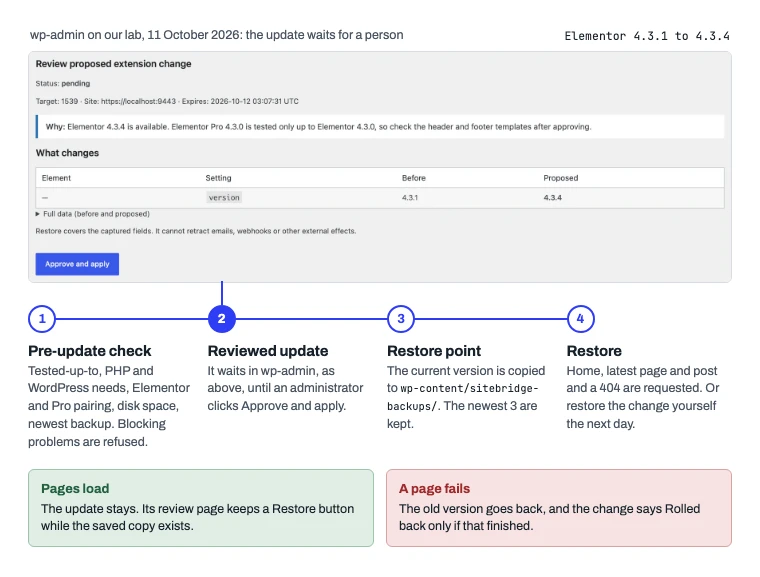
It works in four layers, and each one ships in the plugin. The checks are free; running the update itself is part of Pro.
- A preflight before the update is proposed.
widejoin-extension-update-preflightchecks the offered version, whether a download package exists and the download server accepts it, WordPress and PHP requirements, the version the plugin was tested up to, add-ons that declare an older tested version, Elementor and Elementor Pro pairing, free disk space and the newest site backup. Updates with blocking problems are refused. - A saved copy before the update runs. The current version goes to a random folder under
wp-content/sitebridge-backups/, and the newest 3 per plugin or theme are kept. - A health check after the update. By default each update waits for a person in wp-admin. In Direct, plugin and theme updates are on the ask-before list until an administrator takes them off, and in Review first every change waits. Once it runs, the home page, the latest page and post and a 404 are requested. A failure rolls the update back, and if that rollback does not complete, the change says so instead of reporting "Rolled back".
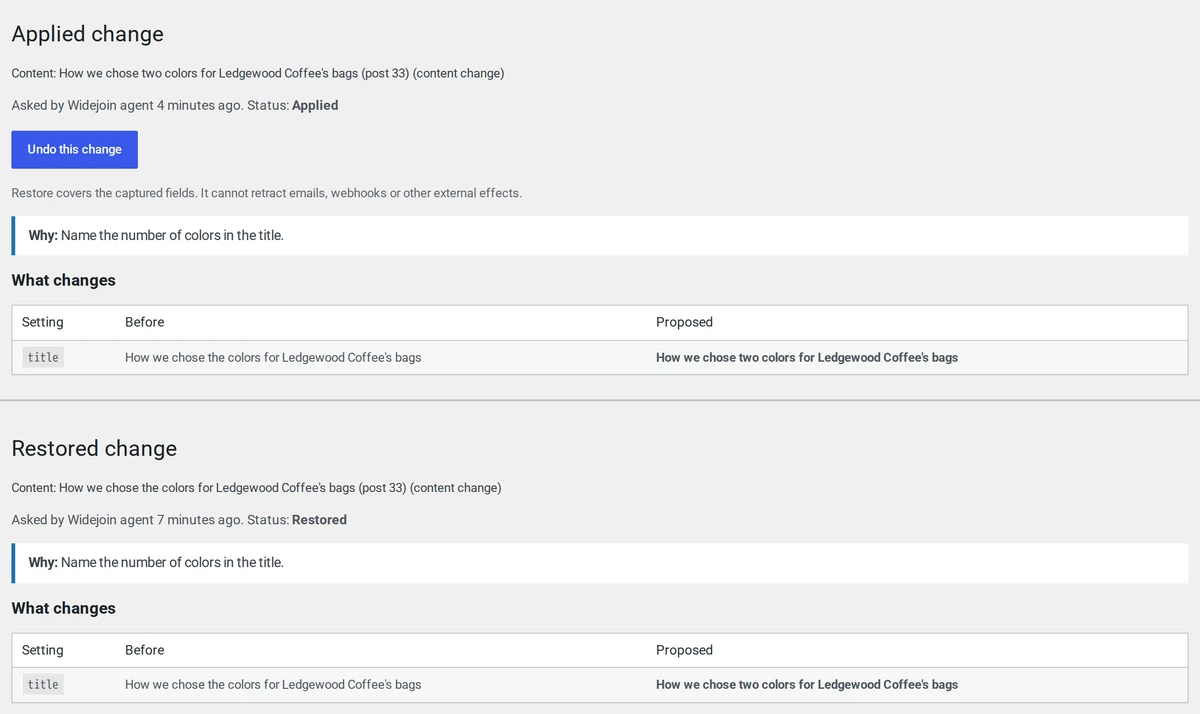
- Restore later. If you spot a problem the next day, Undo this change on the update's page in wp-admin puts the saved copy back while it exists.
If your AI client runs the updates, it proposes them through MCP and the same steps apply. widejoin-prepare-update-plan turns "update WordPress and the plugins" into one plan that runs in order and stops at the first failure, and an update plan always waits for a person. Connect your AI client explains how the agent connects.
Would Widejoin have stopped the Dynamic.ooo outage?
Yes, if the update had gone through Widejoin, before it ran. Ours went in as a zip upload outside it, which the next section covers. The preflight reads the "tested up to" headers active add-ons declare, such as "Elementor Pro tested up to". When an update is a new major version beyond what an add-on declares, the update is blocked, and the message names the add-on and whether an update is offered for it.
A newer minor version only warns. The preflight also asks the download server about the package with a HEAD request, so a one-time link is not used up, and blocks when the server refuses the download. That was the second half of our 28 September problem.
What if the update ran outside Widejoin?
That is what the crash guard is for, and it is in the free plugin. An administrator turns it on under Settings, Advanced, Crash guard on the Widejoin screen in wp-admin; it is off by default. It installs a must-use plugin and the fatal-error-handler.php drop-in, which depend on nothing in Widejoin.
From then on, before WordPress's upgrader replaces a plugin or theme, a copy is saved. That covers updates from wp-admin, automatic updates, "Replace current with uploaded" and WP-CLI.
The guard acts only when one plugin or theme crashes the whole site while WordPress loads, on 3 requests within 2 minutes from 2 request types or paths. A crash on a single page is only recorded. With the default policy it first restores the previous version of a plugin or theme replaced in the last hour. If there is none, it switches the crashing plugin off without moving files, or moves a crashing theme to the newest installed default theme.
After each step it checks the home page, the newest page, wp-login, the REST API root and the MCP endpoint. A step that does not help is undone. The administrator gets one email.
On our lab we replayed the Dynamic.ooo pattern with a plugin pair built to fail the same way. The site returned the critical error page, and the guard put version 1.0.0 back and had the home page answering within 60 seconds, with nobody touching it.
What can a rollback not undo?
Plan for these before you update.
- Database upgrades. If the new version upgraded its tables, restoring the old files does not reverse that. Widejoin's
widejoin-data-upgrade-statustool reports pending upgrades for Elementor, Elementor Pro, WooCommerce and Yoast SEO, so you can see one coming. - WordPress core updates. They cannot be restored from inside WordPress.
widejoin-core-update-preflightchecks the target version and prints this site's recovery commands before you approve. - Anything without a saved copy. If no copy exists, restore says so and the site needs your backup.
One known issue applies in Widejoin 0.6.0 through 1.0.2. Restoring a downgrade made from an uploaded zip with allow_downgrade does not use the saved copy. It downloads from the plugin's update server instead, which gives you the version that server offers today, usually the newest, or a refusal. Take a backup before a downgrade. The restore guide lists every limit.
Should you still keep backups?
Yes. Restore returns what an applied change captured. It is not a site backup, and it cannot recall an email, a webhook or what another plugin did on save. A host or plugin backup is still your floor. Widejoin's preflight checks for your newest site backup before you approve.
If you run updates for client sites, the WordPress maintenance cost guide compares what care plans charge for doing this by hand. If an AI agent runs them for you, how a Claude Code agent built a WordPress site shows what it asked a person for along the way. More posts from our test lab are on the blog.
How do I try a safe plugin update?
On a staging copy. Turn on the crash guard first; it is free. Then ask your agent to update one plugin, watch the update wait for you in wp-admin, approve it, and undo it from the same page. Updates need Pro, and the 14 day Pro trial covers up to 10 sites with no card.
Questions
Does WordPress roll back a plugin update on its own?
In two cases. Since WordPress 6.3, a manual plugin or theme update that fails while installing is put back. Since 6.6, an automatic update of an active plugin that leaves a PHP fatal error on the home page is rolled back. A manual update that installs cleanly and then breaks a page is not.
Can Widejoin undo a plugin update?
Yes, while the saved copy exists. Widejoin keeps the newest 3 copies per plugin or theme, and restore puts the old version back. Database upgrades the new version ran are not undone. Updates through Widejoin are part of Pro.
Can Widejoin undo a WordPress core update?
No. A core update cannot be restored from inside WordPress. Widejoin checks the target version first and prints the site's recovery commands before you approve.
Is restore a full backup?
No. Restore returns what an applied change captured, such as the previous plugin files. Keep your own site backup, and take one before any downgrade.
Does the crash guard need Widejoin to be running?
No. The guard is a must-use plugin and a fatal error drop-in that depend on nothing in Widejoin, so they keep working when it or any other plugin crashes. It is in the free plugin, off until an administrator turns it on.
Point your agent at a client site today.
14 days of Pro on up to 10 sites. No card. Connect your client and ask for a page in the builder you already use.