Connect ChatGPT to WordPress: what works today, and what we have not tested yet
You connect ChatGPT to WordPress through an MCP server that signs in with OAuth, and the Widejoin hosted server offers that sign-in. On ChatGPT Business, Enterprise and Edu the connection can read and change your site, while Pro gets read and fetch only. We have not yet completed a sign-in from the real ChatGPT app. The OpenAI tool we have config-tested is Codex CLI.
We re-read OpenAI's help article and two developer guides on 23 November 2026. The plan rules and menu steps below are as OpenAI's pages gave them then.
Widejoin is a WordPress plugin and MCP (Model Context Protocol) server for AI agents. Every fact below carries the date we read it or ran it on our lab.
Free to start. No credit card.
On this page
- Can you connect ChatGPT to WordPress?
- Which ChatGPT plans can connect a custom MCP server?
- What do you need before you start?
- Why does ChatGPT need OAuth instead of a token?
- How do you add Widejoin to ChatGPT?
- Why can ChatGPT read your site but not change it?
- What works from OpenAI today?
- What about ChatGPT plugins for WordPress?
- Which AI clients can edit WordPress through MCP today?
- When will ChatGPT be on the tested list?
- Questions
Can you connect ChatGPT to WordPress?
Yes, to a WordPress MCP server that offers OAuth sign-in. The Widejoin hosted server at https://widejoin.com/mcp offers it. On our lab, the MCP SDK's own OAuth client, version 1.32.1, found the server, registered, signed in and listed the tools. A sign-in from the ChatGPT app itself is the step we have not completed, so ChatGPT is not on our tested list yet.
What ChatGPT may do once connected depends on your plan. OpenAI's help article on custom MCP servers read "Updated: 27 days ago" when we opened it on 23 November 2026, so its last change was around 27 October. Check it again before you buy a plan for this.
Which ChatGPT plans can connect a custom MCP server?
Business, Enterprise and Edu get full MCP, with tools that read and tools that change data. Pro can connect a server for read and fetch only. This is how OpenAI's help article listed the plans on 23 November 2026:
| ChatGPT plan | Custom MCP servers |
|---|---|
| Business | Read and write tools; only admins and owners can add a server |
| Enterprise, Edu | Read and write tools; admins and owners, or members an admin allows, can add a server |
| Pro | Read and fetch only |
| Plus, Free | Not mentioned in OpenAI's help article |
This post covers the custom server route.
ChatGPT asks you to confirm actions "based on app permissions and the action's context", in the help article's words, and OpenAI's developer guide says write actions require confirmation by default. Only admins and owners can publish a server for the whole workspace. It works in ChatGPT on the web only: the help article answers "No, web only" for mobile.
What do you need before you start?
Three things, all checked on 23 November 2026:
- A workspace that allows it. ChatGPT Business, where you are an admin or owner, or Enterprise or Edu, where you are an admin, an owner or a member an admin has allowed.
- ChatGPT on the web. The mobile apps cannot add a custom MCP server.
- A Widejoin account with your WordPress site connected to it. Install the free plugin first if the site does not have it.
Why does ChatGPT need OAuth instead of a token?
Because ChatGPT has nowhere to put a token. OpenAI's authentication guide says ChatGPT cannot "present custom API keys" (read 23 November 2026), and the server form offers OAuth, no authentication, or either one. ChatGPT sends you to the server's own sign-in page, you approve access there, and ChatGPT receives a token it can renew. You never paste a password or token into ChatGPT.
With Widejoin, that sign-in page is your Widejoin account. You pick the organization, all sites or one site, and read only or read and change. How many sites that reaches depends on your plan, and Widejoin pricing lists the site limits.
How do you add Widejoin to ChatGPT?
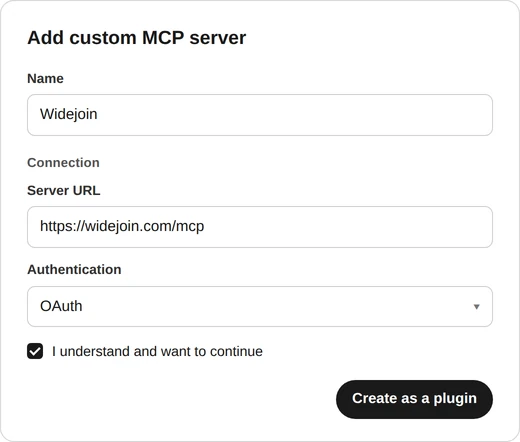
These are the steps in the Connect your AI client guide, which follow OpenAI's help article. The form looks like the illustration at the top of this post.
Open Plugins. In ChatGPT on the web, go to Plugins, select the plus button, then Add custom MCP server.
Enter the address. Give it a name, and under Connection paste
https://widejoin.com/mcp.Choose OAuth for authentication.
Create it. Review the risk warning, tick I understand and want to continue, then select Create as a plugin.
Install and sign in. Install the plugin and sign in to Widejoin when ChatGPT asks. In a new chat, type @ and pick the plugin.
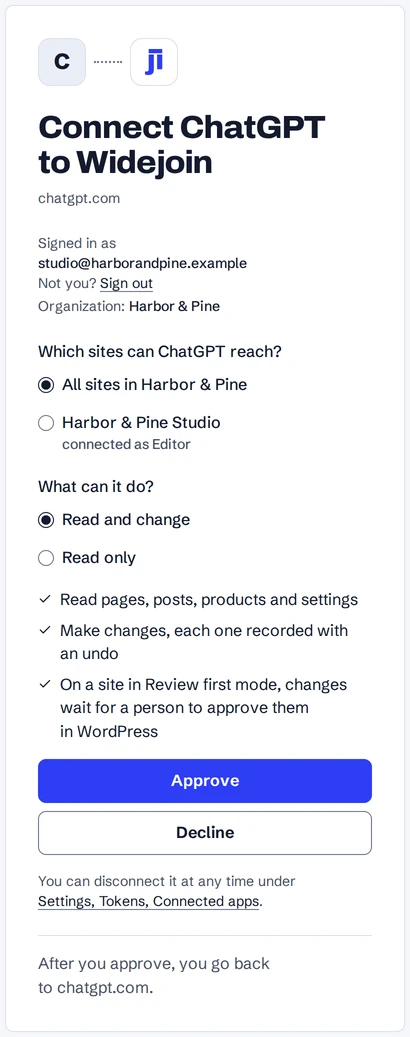
The sign-in our lab served for a client registered as ChatGPT.
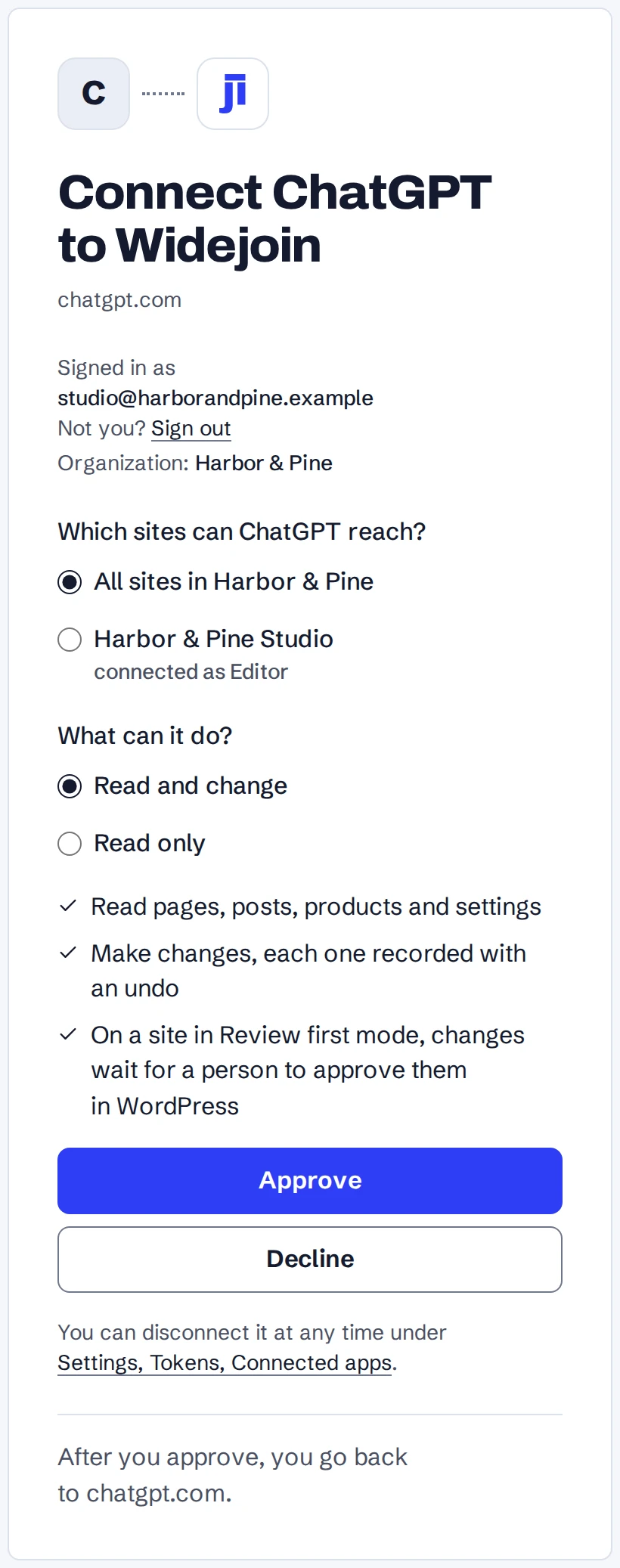
The sign-in in step 5 is the one our lab served. We have not run these steps in the ChatGPT app yet, so treat them as untested until the Connect guide says otherwise.
Why can ChatGPT read your site but not change it?
Look at three settings, in this order:
- Your ChatGPT plan. On Pro, custom MCP servers are read and fetch only.
- The access you chose at sign-in. Read only lets ChatGPT read your sites and nothing more. Sign in again and pick Read and change.
- The agent's WordPress role. The agent acts as its own WordPress user and can never do more than that user may. A change the user may not make waits in wp-admin for someone whose role may.
Some changes wait on purpose. Plugin, theme and core updates, deletes and user changes are on the ask-before list until an administrator turns them off, as how a change works explains.
What works from OpenAI today?
Codex CLI: we ran a test client with its config format against a lab gateway; the Codex CLI app itself was not run. It takes a token, so it connects to Widejoin over standard MCP. The Codex app is a separate product that we have not run.
Create a token in the Widejoin console's AI client step, and put it in an environment variable named
WIDEJOIN_TOKEN.Add Widejoin to your Codex config:
[mcp_servers.widejoin] url = "https://widejoin.com/mcp" bearer_token_env_var = "WIDEJOIN_TOKEN"Start Codex and ask it to list your sites. It reads the token from the variable.
The key names match OpenAI's Codex MCP page as we read it on 23 November 2026. Until ChatGPT passes a real sign-in, Codex CLI is the OpenAI route we point people to. Each change it makes through Widejoin is recorded on the site, and most can be undone in one call.
What about ChatGPT plugins for WordPress?
Most plugins listed as "ChatGPT WordPress plugins" are chatbots and content writers. They call OpenAI's API from your site to answer visitors or draft posts. Letting an AI agent build and change the site itself is a different job, and it is the one an MCP server like Widejoin does.
Which AI clients can edit WordPress through MCP today?
| Client | Status with Widejoin | How we ran it |
|---|---|---|
| Claude Code | Tested | Its own app |
| Cursor | Config test only | Test client with its config format against a lab gateway; the app was not run |
| VS Code with GitHub Copilot | Config test only | Test client with its config format against a lab gateway; the app was not run |
| Codex CLI | Config test only | Test client with its config format against a lab gateway; the app was not run |
| ChatGPT | OAuth offered, not tested | The MCP SDK's OAuth client signed in on our lab; the ChatGPT app was not run |
The Connect your AI client guide has the settings and status for every client we checked, and connecting Claude Code to WordPress has the one we ran in its own app. How Claude Code built a WordPress client site through Widejoin shows the tested client at work, with every approval counted.
When will ChatGPT be on the tested list?
When we complete a sign-in from the real ChatGPT app and run a change through it. We have not set a date, and we will not promise one here. The console's AI client step shows each client's current status, so that is the place to check.
You do not have to wait. Create a free account, connect Codex CLI or Claude Code, and ask for one change. On a new install it applies at once in Direct and the agent can undo it in one call, while a site set to Review first waits for your approval in wp-admin. If you are on ChatGPT Business, Enterprise or Edu and try the sign-in from ChatGPT, tell us how it went and we will add your result to the tested list. A new account starts with a 14 day Pro trial on up to 10 sites, no card, if your email or company has not had one. Widejoin pricing shows what Pro adds.
See the FAQ and the security page for what the agent can and cannot reach.
Questions
Can ChatGPT edit my WordPress site?
Through a WordPress MCP server that offers OAuth sign-in, on a ChatGPT Business, Enterprise or Edu workspace. The Widejoin hosted server offers OAuth, but we have not completed a sign-in from the ChatGPT app yet.
Does ChatGPT Plus work with MCP servers?
OpenAI's help article on custom MCP servers, read on 23 November 2026, does not mention Plus or Free. It says Pro can connect custom MCP servers with read and fetch only, and full MCP is for Business, Enterprise and Edu.
Is there an OpenAI tool that connects to Widejoin now?
Codex CLI: we ran a test client with its config format against a lab gateway; the Codex CLI app itself was not run. It takes a token and connects over standard MCP. The Codex app is a separate product that we have not run.
Which AI client is tested with Widejoin?
Claude Code was tested in the real app. For 15 other named clients, Codex CLI among them, we ran a test client with the config format each app uses, against a lab gateway; the apps themselves were not run.
Point your agent at a client site today.
14 days of Pro on up to 10 sites. No card. Connect your client and ask for a page in the builder you already use.