Contact Form 7 MCP: labels, placeholders and required fields from your AI agent
Does Widejoin work with Contact Form 7?
Widejoin lets your AI agent change Contact Form 7 labels, placeholders and required fields, tested on Contact Form 7 6.1.7, and each change keeps a record. These writes are in the free plugin, and hosted Pro from $99 a year adds sites, calls and history.
14 days of Pro on up to 10 sites. No card.
Free plugin: all 3 Contact Form 7 writes and 4 Contact Form 7 reads. Pro, $99 a year, adds hosted access for 3 sites, more calls a day and a longer change history.
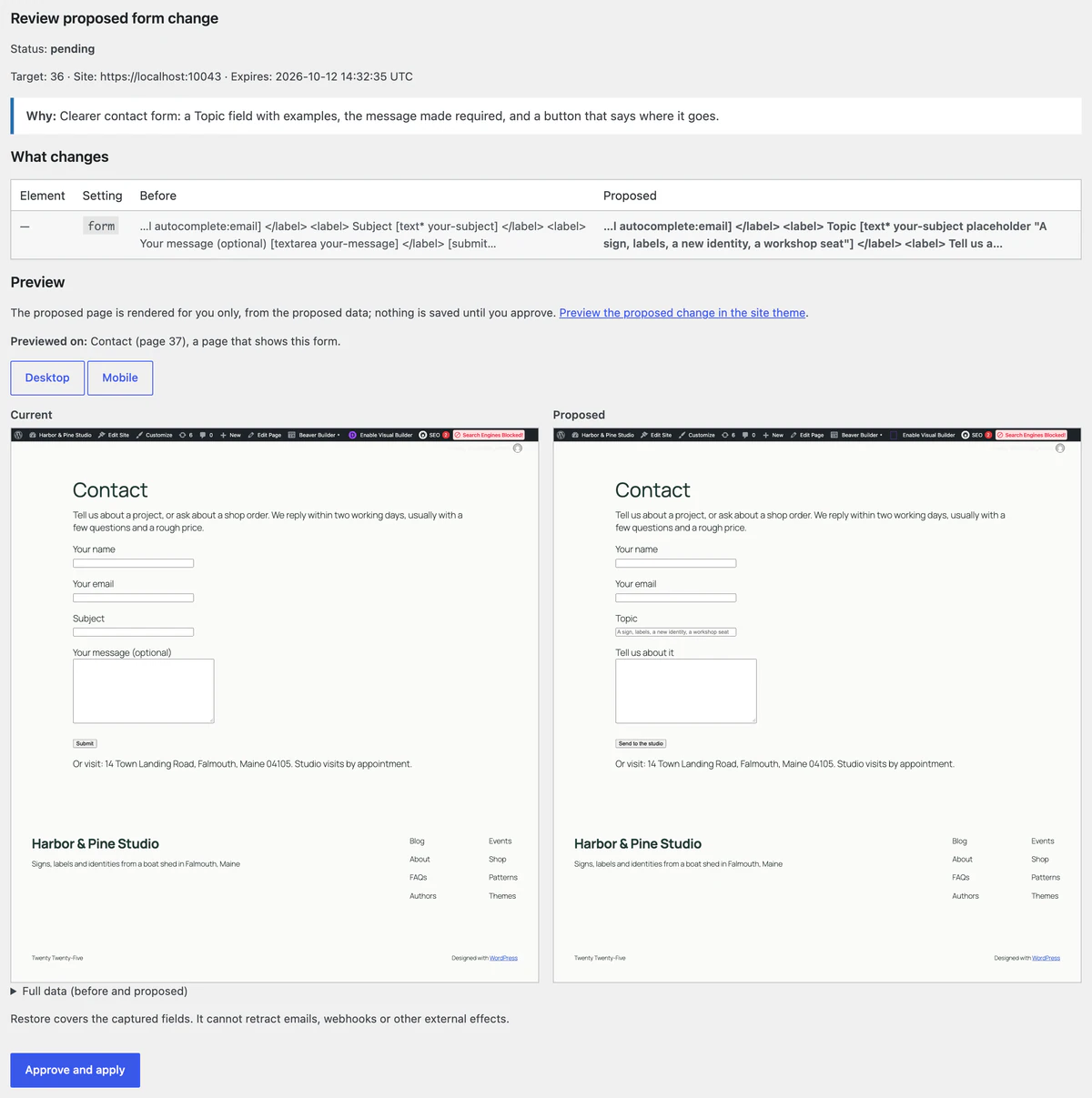
Field labels, placeholders and which fields are required on a Contact Form 7 form can be changed by your AI agent through Widejoin. A mail change is shown in full before it applies. In Direct mode a form edit applies at once as the agent's WordPress user and keeps a record; Review first holds it in wp-admin instead.
Which Contact Form 7 tools does Widejoin have?
7 tools:
list-formslists the forms you can edit with their shortcodes and fields.read-formreads one form's template and fields.prepare-formchanges fields.prepare-new-formmakes a new form from a field list. Its mail goes to the site admin email until you change it, so in Direct mode a new form waits for a person by default: where form mail goes is on the site's ask-before list.form-placementgives the shortcode or block for your page builder and lists the pages that show the form now.read-form-deliveryshows an administrator who receives a form's mail and who it comes from.prepare-form-deliverylets an administrator change the recipient, sender address, reply address, subject or body. It waits for a person by default for the same reason.
What can the agent change in Contact Form 7?
- Field labels, by field name.
- Whether a field is required.
- Placeholders on text fields.
- The choices in select, checkbox and radio fields.
- The submit button label.
An administrator can also have the agent replace the whole form template, as long as it keeps every field the mail settings use. Edits save through Contact Form 7's own code, and every other field stays as it was.
What will it not do in Contact Form 7?
Field edits never change mail settings, and a field the mail uses cannot be removed. Only an administrator's agent can read or change where mail goes. A mail change waits for a person by default, and it is approved on its own, never in a bulk approval. Mail can go to up to 5 fixed addresses or the site admin, never to an address a visitor typed. Cc, Bcc and attachments show only as counts and stay as they are, and so do auto-replies (Mail (2)). It reads no submissions, and Contact Form 7 stores none. It also writes only to Contact Form 7 6.x.
Where did this come from?
Our own company site had a contact form that still asked "Your inquiry about" with the theme's demo choices One, Two and Three, and a consent box that read "i'm agreed to the Terms & Conditons". Neither could be fixed through MCP at the time. The choices and the consent text can now be edited, and both fixes were tested on our lab.
What does a mail change look like?
In our lab test for this (SB-523), a placed form first mailed the site admin. The agent proposed sending it to ops@example.net instead, and the review flagged that address as "outside this site". After approval the next test message went to ops@example.net. Restore sent the one after that back to the site admin. A change like this one is what Direct mode still holds for a person by default.
How does restore work?
Restore returns the exact previous form. In Direct mode the agent undoes a change with one restore-change call, and a person can restore it from the change's page in wp-admin, which says what restore covers: "Restore covers the captured fields. It cannot retract emails, webhooks or other external effects."
On 11 October 2026 we changed the contact form of our demo client site. "Subject" became "Topic" with the placeholder "A sign, labels, a new identity, a workshop seat", the optional message became a required "Tell us about it", and "Submit" became "Send to the studio". The review showed the Contact page as it was and as proposed, side by side, before anything was saved.
Related: the WPCode integration, the ACF integration, how a change works and Connect your AI client.
Questions
Which Contact Form 7 version did you test?
Contact Form 7 6.1.7, on WordPress 7.1.2.
Can the agent make a field required?
Yes. It can make a field required or optional, change its label and placeholder, and rename the submit button.
Can the agent see where form emails go?
An administrator's agent can. It reads who receives a form's mail and can change the recipient, sender or reply address. That change waits for a person by default, because where form mail goes is on the site's ask-before list, and it is approved on its own. Other accounts never see addresses, and no submissions are read.
Can I see the form before a change goes live?
Yes, in Review first, or when the agent asks for review on that call. The review shows the page that holds the form as it is now and as proposed.
Point your agent at a client site today.
14 days of Pro on up to 10 sites. No card. Connect your client and ask for a page in the builder you already use.