WPCode MCP: snippets, saved inactive from your AI agent
Does Widejoin work with WPCode?
Widejoin lets your AI agent change WPCode snippets, saved inactive, tested on WPCode 2.3.9, and each change keeps a record. These writes come with the Pro add-on from $99 a year.
14 days of Pro on up to 10 sites. No card.
Free plugin: 2 WPCode reads. Pro, $99 a year for 3 sites: all 3 WPCode writes.
Every WPCode snippet your AI agent writes through Widejoin is saved inactive, so no new code runs on your site until an administrator turns it on. The agent can write a new snippet or change an existing one. The edit itself applies at once in Direct mode and keeps a record you can restore.
Which WPCode tools does Widejoin have?
5 tools:
- Read:
list-snippetslists snippets without their code, andread-snippetreads one snippet's code as plain text, never running it. - Write:
create-disabled-snippetsaves a new inactive snippet,prepare-snippetedits an inactive snippet, andprepare-snippet-activationturns a snippet on or off.
What can the agent change in WPCode?
- New PHP, JavaScript, CSS and HTML snippets, stored byte for byte, inactive, with automatic insertion off. PHP is syntax checked without being run.
- Title, code and type of an inactive snippet, as a recorded change.
- Turning a shortcode snippet on or off, as a recorded change.
Only an administrator allowed to add code can write snippets: the tools need WordPress's manage_options, edit_plugins and unfiltered_html capabilities and WPCode's own wpcode_edit_snippets. An agent account made by First connect may not add code until an administrator clicks "Allow the agent to add code" on that screen. A retry with different code under the same request is refused rather than overwriting the first one.
What will it not do in WPCode?
- It never changes auto-insert snippets, the kind that run across the whole site.
- It never edits a snippet while it is active.
- It cannot turn a snippet on unless an administrator has ticked "Allow proposals to activate manual WPCode snippets" in wp-admin. That setting is off by default. With it on, an activation waits for a person in Review first and applies in the agent's call in Direct mode, like other changes.
Turning a snippet off is always allowed.
How does restore work?
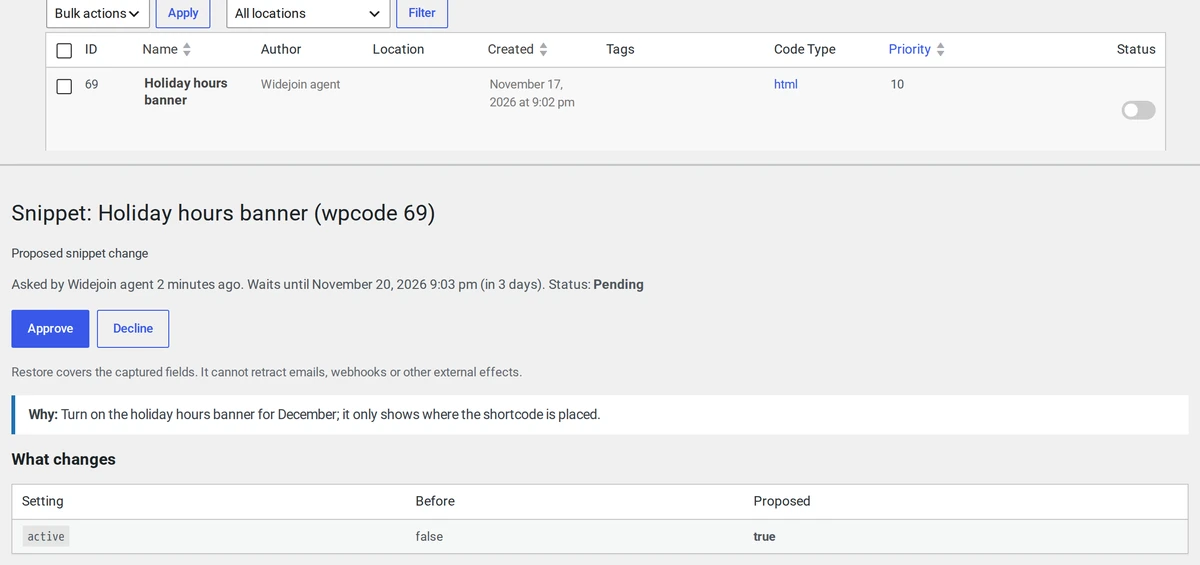
Restore returns the snippet to its previous state, so restoring an activation turns the snippet off again. In Direct mode the agent undoes a change with one restore-change call, and a person can restore it from the change's page in wp-admin, which says what restore covers: "Restore covers the captured fields. It cannot retract emails, webhooks or other external effects."
On 11 October 2026 the agent created a "Holiday hours banner" HTML snippet on our demo client site. WPCode listed it inactive with no insertion location. The agent then asked to turn it on for December. That lab site held every change for approval, so the review showed active going from false to true, waiting for a person. The banner shows only where its shortcode is placed.
Related: the Contact Form 7 integration, the Gutenberg integration, how a change works and Connect your AI client.
Questions
Which WPCode version did you test?
WPCode 2.3.9, on WordPress 7.1.2.
Can the agent run code on my site?
Not unless a person lets it. New snippets are saved inactive, and turning one on needs an administrator setting that is off by default. With it on, an activation waits for a person in Review first and applies in the agent's call in Direct mode.
Can the agent change a snippet that is already running?
No. Active snippets cannot be edited, and auto-insert snippets are never changed.
Does an inactive snippet print anything on the page?
No. Our tests check that a disabled snippet produces no output on a public page.
Point your agent at a client site today.
14 days of Pro on up to 10 sites. No card. Connect your client and ask for a page in the builder you already use.